Snowpark-Optimized Warehouses: How to Configure resource_constraints for Maximum Performance

If you’re running machine learning workloads, complex data transformations, or memory-intensive ETL pipelines in Snowflake, you’ve probably encountered situations where standard warehouses just don’t cut it. Maybe your queries are spilling to disk, your ML training jobs are timing out, or you’re burning through credits without getting the performance you need.
That’s exactly the problem Snowpark-optimized warehouses were designed to solve. And with the resource_constraints setting now generally available, you have unprecedented control over how these specialized compute resources are configured.
This guide breaks down everything you need to know about configuring resource_constraints for different workload types—from ML training to interactive analytics—so you can optimize both performance and cost.
Executive Summary
- Snowpark-optimized warehouses are built for memory-intensive work (ML training, heavy ETL, complex transforms) and differ from standard warehouses in memory, cache, and single-node design.
- The RESOURCE_CONSTRAINT setting (e.g., MEMORY_16X, MEMORY_16X_X86, MEMORY_64X_X86) lets you match memory/CPU to workload and library compatibility requirements.
- Start conservative, monitor spill-to-disk and timeouts, then scale up; higher memory can lower total credits if jobs finish much faster.
- Use Snowpark-optimized for ML/ETL; keep interactive BI on standard (or 1X) for latency and cost.
- Key limits: longer startup, single-node contention, preview/availability nuances for high-memory profiles, and x86 needs for some packages.
What Makes Snowpark-Optimized Warehouses Different?
Snowpark-optimized warehouses aren’t just bigger versions of standard warehouses. They’re fundamentally different in how they allocate resources:
- Up to 16x more memory per node compared to standard warehouses
- 10x larger local cache for intermediate results
- Flexible CPU architecture choices (default or x86)
- Single-node design optimized for memory-intensive operations rather than parallelized queries
The resource_constraints setting gives you fine-grained control over these resources, letting you match your warehouse configuration to your specific workload requirements.
Understanding the resource_constraints Options
The setting is configured via CREATE WAREHOUSE or ALTER WAREHOUSE commands. Here are your options:
Memory Configurations
- MEMORY_1X: Standard memory allocation (baseline)
- MEMORY_16X: 16x the memory of standard (this is the default for Snowpark-optimized warehouses)
- MEMORY_64X: 64x memory for the most demanding workloads
CPU Architecture
Each memory option can be paired with x86 architecture by appending _X86 (e.g., MEMORY_16X_X86). This is critical for compatibility with certain third-party libraries that require x86-specific instructions.
Quick Syntax Reference
-- Create a Snowpark-optimized warehouse with 16x memory and x86 CPU
CREATE WAREHOUSE ml_training_wh

  WAREHOUSE_SIZE = 'LARGE'

  WAREHOUSE_TYPE = 'SNOWPARK-OPTIMIZED'

  RESOURCE_CONSTRAINT = 'MEMORY_16X_X86';

-- Modify an existing warehouse

ALTER WAREHOUSE ml_training_wh

  SET RESOURCE_CONSTRAINT = 'MEMORY_64X_X86';
Workload-Specific Configuration Recommendations
Not every workload needs the same configuration. Here’s how to match your resource constraints to your specific use case:
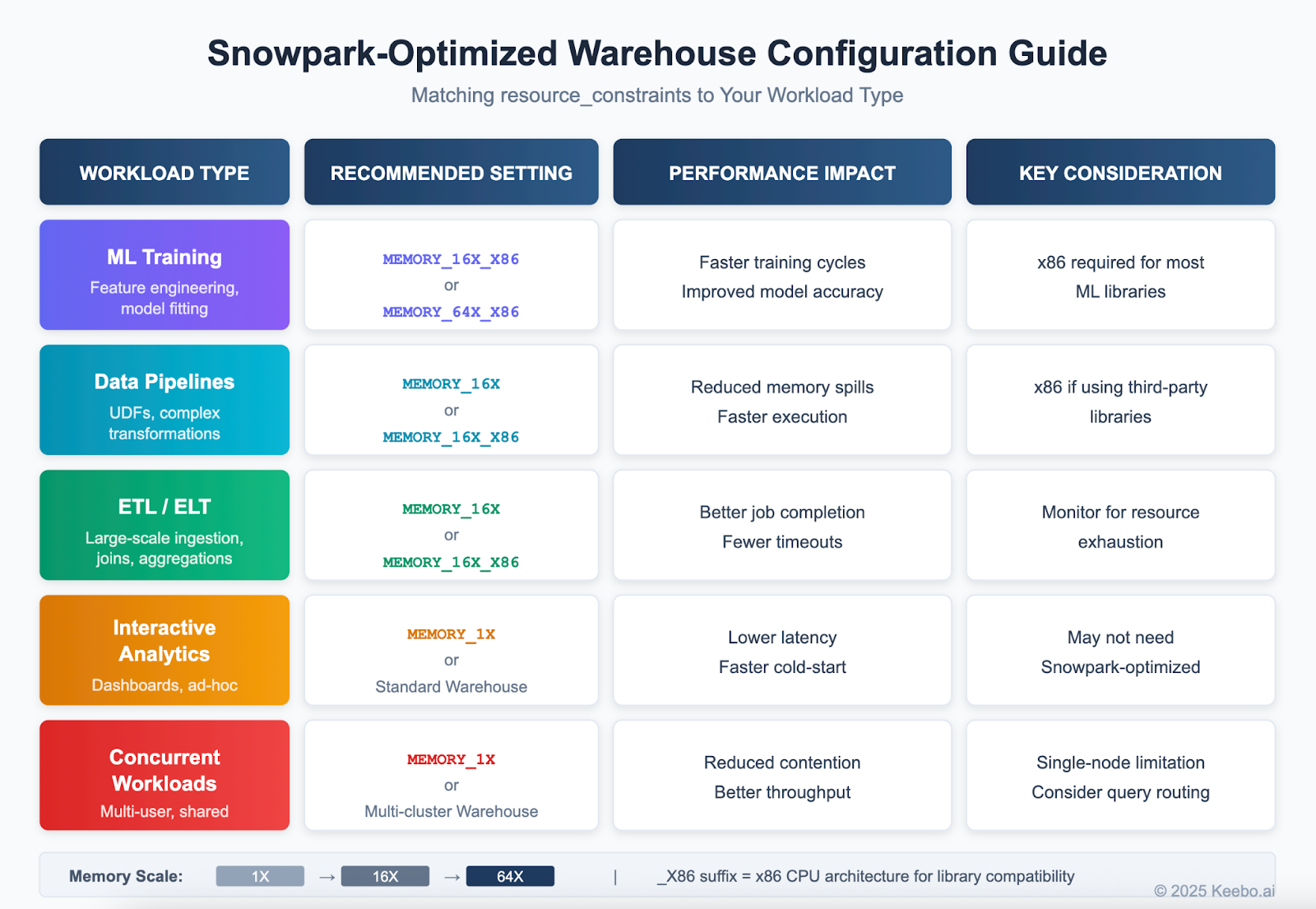
Machine Learning Training
Recommended: MEMORY_16X_X86 or MEMORY_64X_X86
ML training jobs—feature engineering, model fitting, hyperparameter tuning—are the bread and butter of Snowpark-optimized warehouses. These workloads typically need substantial memory to hold training data in memory and x86 architecture for compatibility with libraries like TensorFlow, scikit-learn, and XGBoost. If you’re training models that previously required external compute resources, MEMORY_64X_X86 can often handle them entirely within Snowflake.
Data Transformation Pipelines
Recommended: MEMORY_16X or MEMORY_16X_X86
Heavy UDF usage, complex transformations, and batch processing benefit from the expanded memory. The x86 variant is necessary if you’re using third-party libraries or legacy stored procedures with native code dependencies. If your pipelines are pure SQL or use only Snowflake-native Python packages, the default (non-x86) architecture may offer slightly better performance.
ETL/ELT Processes
Recommended: MEMORY_16X or MEMORY_16X_X86
Large-scale data ingestion, multi-table joins, and complex aggregations need memory headroom to avoid spilling. If you’re seeing query timeouts or significant spill-to-disk in your ETL jobs, bumping up the memory constraint often solves the problem immediately.
Interactive Analytics & Dashboards
Recommended: MEMORY_1X or MEMORY_1X_X86
Here’s a counterintuitive one: for ad-hoc queries and BI tool connections, you probably don’t need Snowpark-optimized warehouses at all. These workloads prioritize low latency over memory capacity. If you’re using them for dashboards connected via Tableau or Power BI, you’re likely overpaying. Standard warehouses—or Snowpark-optimized with MEMORY_1X constraints—will give you faster cold-start times and lower per-credit costs.
Concurrent & Multi-User Workloads
Recommended: MEMORY_1X or standard multi-cluster warehouses
Snowpark-optimized warehouses are single-node by design. If you have multiple users running queries simultaneously, resource contention becomes an issue. For shared environments, consider standard multi-cluster warehouses with auto-scaling, or implement query routing to direct memory-intensive workloads to dedicated Snowpark-optimized warehouses.
Quick Reference: Configurations by Workload Type
A Practical Configuration Strategy
Getting resource_constraints right isn’t a one-time decision—it’s an iterative process. Here’s a systematic approach:
1. Establish Your Baseline
Before changing anything, capture your current state. Use QUERY_HISTORY and WAREHOUSE_METERING_HISTORY to understand query durations, memory usage patterns, and credit consumption. Look specifically for queries with high bytes_spilled_to_local_storage or bytes_spilled_to_remote_storage—these are prime candidates for memory constraint increases.
2. Start Conservative, Then Scale Up
Begin with MEMORY_1X or the default MEMORY_16X and monitor. Only increase memory constraints when you have concrete evidence of memory pressure. Higher memory means higher per-credit costs, so don’t over-provision just to be safe.
3. Test CPU Architecture Compatibility
If you’re using Python UDFs with third-party packages, test with x86 architecture first. Some packages (particularly those with compiled C extensions) will simply fail on non-x86 architectures. Better to discover this in testing than in production.
4. Implement Workload Separation
Don’t try to run everything on one warehouse. Create dedicated Snowpark-optimized warehouses for memory-intensive workloads (ML, heavy ETL) and use standard warehouses for interactive queries. This lets you optimize each for its specific requirements and provides better cost visibility.
5. Automate Scaling Decisions
Use WAREHOUSE_EVENT_HISTORY combined with orchestration tools like Airflow or dbt to dynamically adjust constraints based on workload patterns. For example, you might run ML training overnight with MEMORY_64X_X86, then scale down to MEMORY_16X during business hours for lighter data engineering work.
The Cost-Performance Tradeoff
Higher memory constraints mean higher credit consumption per hour. But that doesn’t necessarily mean higher total cost—if a MEMORY_64X configuration completes your ML training in 30 minutes instead of 2 hours with MEMORY_16X, you may actually spend fewer credits overall.
The key metrics to track:
- Total credits consumed per job (not just hourly rate)
- Job completion time (faster completion = less idle warehouse time)
- Spill-to-disk events (these are expensive in terms of performance)
- Query timeout frequency (timeouts waste credits and require re-runs)
For organizations serious about Snowflake cost management, automated optimization tools can help identify the right constraint settings based on actual workload patterns, rather than guesswork.
If you’d rather not manually tune these settings, Keebo’s Warehouse Optimization already supports Snowpark-optimized warehouses. It automatically analyzes your workload patterns and adjusts resource constraints to balance performance and cost—no manual configuration required. This is particularly useful for teams running diverse workloads where the optimal settings change throughout the day or week.
Known Limitations to Keep in Mind
Before you dive in, be aware of a few constraints:
- Longer startup times: Snowpark-optimized warehouses take longer to provision than standard warehouses. If cold-start latency matters, keep them running or use aggressive auto-resume.
- Single-node architecture: These warehouses don’t parallelize across multiple nodes like standard multi-cluster warehouses. For highly parallelized queries, standard warehouses may actually perform better.
- Platform availability: MEMORY_64X (1TB) constraints are currently available only on AWS in preview. Azure and GCP support is still rolling out.
- ARM compatibility: The default (non-x86) architecture uses ARM processors. Some packages with native code won’t work without the x86 constraint.
The Bottom Line
The resource_constraints setting transforms Snowpark-optimized warehouses from a blunt instrument into a precision tool. By matching memory and CPU architecture to your specific workloads, you can eliminate memory spills, reduce job failures, and—counterintuitively—often reduce total credit consumption by completing jobs faster.
The key is treating configuration as an ongoing optimization process rather than a one-time decision. Monitor your workloads, measure the impact of changes, and don’t be afraid to iterate. The teams getting the best results are those who invest in understanding their workload patterns and tuning accordingly.
Whether you’re running ML pipelines, heavy ETL jobs, or complex data transformations, getting these settings right can make the difference between Snowflake being a cost center and being a competitive advantage.
Frequently Asked Questions
What makes Snowpark-optimized warehouses different from standard warehouses?
They offer substantially more memory per node and larger local cache, with a single-node design tuned for memory-bound workloads rather than massive parallelism.
What is RESOURCE_CONSTRAINT and why does it matter?
It’s a warehouse setting that controls memory profile and CPU architecture, so you can pick, for example, MEMORY_16X or MEMORY_64X_X86 to fit your workload’s memory needs and library compatibility.
Which RESOURCE_CONSTRAINT options are available?
Memory profiles include MEMORY_1X, MEMORY_16X (default for Snowpark-optimized), and MEMORY_64X. Each can be paired with x86 (_X86) when libraries require it (e.g., MEMORY_16X_X86).
When should I choose the x86 variants?
Use _X86 when Python UDFs or third-party libraries rely on x86-specific instructions or compiled extensions; some packages will fail without it.
What configurations work best for ML training?
MEMORY_16X_X86 or MEMORY_64X_X86 are recommended, especially for TensorFlow/scikit-learn/XGBoost workloads that hold large datasets in memory and need x86 compatibility.
How should I configure for data transformations and ETL/ELT?
Use MEMORY_16X (add _X86 if you depend on native libraries). Enlarged memory reduces spill-to-disk and timeouts in heavy joins/aggregations.
Should I use Snowpark-optimized for BI dashboards and ad-hoc analytics?
Often no. Interactive workloads typically benefit from standard warehouses (or MEMORY_1X) for faster cold starts and lower cost.
How do I approach tuning without overspending credits?
Establish a baseline, watch spill metrics and timeouts, then scale up only when you see memory pressure. Higher memory can reduce total cost if jobs complete much faster.
What are the key limitations to consider?
Longer startup times, single-node contention at higher concurrency, platform/region availability caveats for top memory tiers, and ARM default architecture compatibility gotchas.
How do I separate workloads across warehouses?
Run memory-intensive ML/ETL on dedicated Snowpark-optimized warehouses, use standard ones for shared/interactive queries, and route work accordingly.
Further Reading
- Snowflake Documentation: Snowpark-optimized Warehouses
- Snowflake Pricing: A Comprehensive Guide to Costs & Savings
- Understanding Warehouse Cost Optimization
- How to Improve Snowflake Query Performance
Author