Snowflake vs. Databricks: Complete Comparison Framework for 2026

Snowflake vs. Databricks: which is the right choice for your data cloud? What are the most important factors to weigh when making that choice? Cost vs. performance? Stability vs. scalability? Ease of use vs. depth of features? The strength of each ecosystem’s native apps and user community?
I’ve spent the last two decades working with AI and database systems, both in academia and industry. As co-founder of Keebo, I’ve also worked extensively with Snowflake and Databricks customers, which has offered deep insight into how the platform works. I also know several Databricks founders from our time as labmates at UC Berkeley and deeply respect what they’ve built.
All that to say, I have a unique perspective on each platform’s strengths. In this comprehensive guide, my goal is not to promote one solution. Instead, I want to give an objective analysis that helps you choose the cloud platform that best fits your company’s needs.
Key Takeaways
- When comparing Snowflake vs. Databricks, neither platform is the outright “winner.” Snowflake was built around governed SQL analytics as a managed service, while Databricks was built around code, data, and AI on open lakehouse storage.
- Cost efficiency for each platform depends on your scale and workload type. Snowflake reaches its minimum efficient scale earlier for SQL-heavy analytics and sporadic small workloads. Databricks economics improve as data volume and machine learning workloads grow.
- Execution matters more than platform selection. Both platforms consume budget through hidden costs (e.g., storage retention, egress, serverless billing, and idle compute) that surface only after implementation. Continuous optimization, not the initial decision, determines what you actually spend.
Table of Contents
- Key Takeaways
- What Is Snowflake?
- What Is Databricks?
- What Is the Difference Between Snowflake and Databricks?
- What Are the Performance Differences for Snowflake vs. Databricks?
- Snowflake vs. Databricks: Which Platform Is More Cost Effective?
- What Are the Major Considerations When It Comes to Switching Platforms?
- How to Decide Whether You Should Use Snowflake or Databricks (or Both)?
- How to Optimize Snowflake vs. Databricks
- Snowflake vs. Databricks: Which is Better?
What Is Snowflake?
Snowflake is a cloud data platform that emerged in 2012 with a radical vision: reimagining the data warehouse for the cloud era. What distinguished Snowflake from the beginning was its architecture that completely separated storage from compute. That concept may seem obvious today, but was revolutionary at the time.
At its foundation, Snowflake’s architecture consists of three distinct layers:
| Storage Layer | Data is stored in proprietary compressed columnar format in cloud object storage (S3, Azure Blob, or Google Cloud Storage). |
| Compute Layer | Virtual warehouses (essentially clusters) that can be scaled up, down, or paused independently. |
| Services Layer | Handles metadata, security, query optimization, and transaction management. |
That these layers are distinct and separate has profound implications. Unlike traditional data warehouses where you provision capacity to handle peak workloads, Snowflake allows you to spin up resources on demand and scale them down when you no longer need them. When it’s optimized, you can use Snowflake to match your resource consumption to your actual workload.
What Is Databricks?
Databricks is a cloud-based data, analytics, and AI platform that emerged from the Apache Spark project at UC Berkeley’s AMPLab. While Spark remains at its core, I’ve seen Databricks evolve from a research project into an enterprise-ready platform with impressive efficiency.
The central thesis of Databricks is a lakehouse architecture, which consists of the following elements:
| Delta Lake | An open-source storage layer that brings ACID transactions to data lakes. |
| Unified Batch and Streaming | Consistent processing paradigms for both historical and real-time data. |
| SQL Analytics | Warehouse-like performance for SQL queries against lake data. |
| Governance Layer | Catalog and lineage tracking across the data lifecycle. |
What Is the Difference Between Snowflake and Databricks?
Each platform reflects different philosophical approaches to data management. Snowflake was designed around making governed analytics feel like a managed cloud service, while Databricks was designed around making data, code, and AI work together on open data in a lakehouse.
Today they overlap substantially, but those original philosophies still shape their architectures and operating models.
Those philosophical differences manifest themselves in numerous ways, which we can easily see by walking through their architectural and functional differences.
Snowflake’s Micro-Partitioning vs. Databricks’ Delta Lake
Snowflake’s primary format for stored data is the micro-partition. These are optimized units of storage, running from 50 to 500 MB in size, that allow for efficient scanning and filtering options.
Databricks, on the other hand, uses Delta Lake as its open source storage layer in Parquet files. This enables ACID transaction support, while maintaining compatibility with the Parquet ecosystem.
While Snowflake takes a fully managed approach to data, Databricks’s Delta Lake gives users more direct, explicit control over partitioning strategies and optimization techniques.
Data Format and Organization Differences
Beyond their core storage formats, these platforms differ in how they organize and manage data. Snowflake uses a proprietary columnar format, while Databricks relies on open source Parquet. Likewise, Snowflake stores metadata within a centralized catalog, while Databricks uses a Unity Catalog or Hive Metastore.
Compute Model
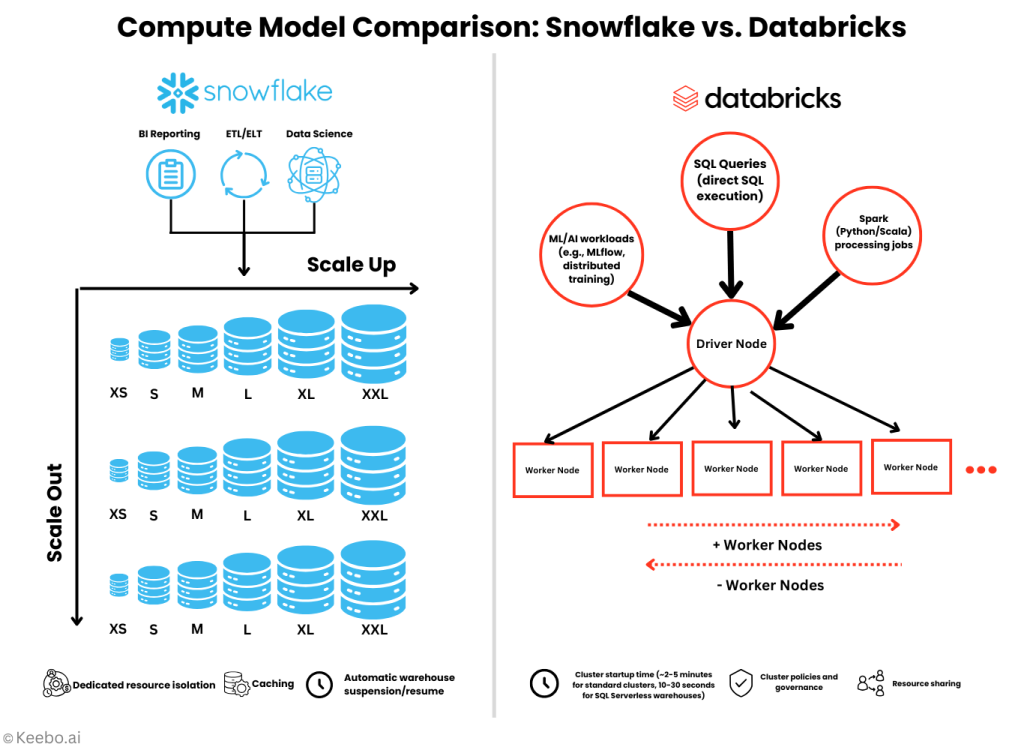
Snowflake’s compute model is built around virtual warehouses, which are essentially individual compute clusters that can be sized, scaled, and suspended as needed. Each warehouse operates with its own resources, cache, and workload. In contrast, Databricks uses a compute-based approach inherited from its Spark foundations.
Another major difference between the two platforms is the syntax used to access its data. Snowflake users access their warehouse primarily through SQL, while Databricks users can leverage multiple programming models (SQL, Python, Scala, R) within the same compute environment.
Additionally, Snowflake fully separates virtual warehouses, each running on its own resources and does not affect others’ performance. Databricks allows more shared resource use, especially within compute. This can improve efficiency but adds more complexity to performance management.
Impact on Storage Costs and Performance
These architectural differences directly influence both storage efficiency and query performance. Here are some cost implications to consider:
- Snowflake charges for actual compressed storage used
- Databricks storage costs depend on the underlying cloud storage (S3, ADLS, GCS)
- Both platforms benefit from compression, though compression ratios can vary
- Databricks may require more hands-on approach to achieve optimal storage efficiency
- Snowflake’s Time Travel and Fail-safe features consume additional storage that must be accounted for
Additionally, here are some performance implications to keep in mind:
- Snowflake’s proprietary format is highly optimized for its query engine
- Delta Lake’s Parquet format benefits from broader ecosystem optimizations
- Snowflake’s metadata layer provides excellent pruning capabilities
- Delta Lake’s data skipping and Z-ordering provide similar benefits but may require more explicit management
Pricing Models
Snowflake and Databricks employ similar approaches to pricing overall: consumption-based models, with the option to pre-purchase Snowflake credits or Databricks Units (DBUs) in bulk, but at a lower per-unit rate. However, when you drill down into the details, there are some differences worth noting.
Snowflake: Credit-Based Pricing
Snowflake uses a primarily consumption-based pricing model, where compute activities consume credits at different rates based on several factors:
- Warehouse size
- Snowflake edition (i.e., Standard, Enterprise, Business Critical, and VPS)
- Regional variations
- Cloud provider variations
The credit system provides a unified currency across Snowflake’s platform, with credits consumed not just by virtual warehouses but also by serverless features like Snowpipe, materialized views, and search optimization.
Although most Snowflake costs are driven by compute, there are other factors that can impact your final bill. For a full breakdown, check out our comprehensive guide to Snowflake pricing.
Databricks: DBU-Based Pricing Across Workload Types
Databricks uses a similar, but distinctly implemented, consumption-based pricing model. Rather than credits, this model is based on DBUs, which vary based on multiple factors:
- Workload type (i.e., All-Purpose Compute, Jobs Compute, SQL, Pro, and Serverless DBUs)
- Regional variation
- Cloud provider variation
- Compute (serverless or classic) configuration
- Pricing tiers (i.e., Standard, Premium, and Enterprise)
Additionally, Databricks charges for runtime on the underlying cloud instances, which means proper compute configuration and autoscaling are critical for cost management.
What Are the Performance Differences for Snowflake vs. Databricks?
Snowflake and Databricks differ not only in how (and how quickly) they incur costs, but also in terms of performance efficiency. Each one wins in different places depending on your organization’s workload type(s), data volume, and average query pattern.
Data Ingestion
Snowflake loads through COPY, Snowpipe for continuous serverless ingestion, and external tables that skip loading entirely. Throughput scales predictably with warehouse size. Databricks uses Auto Loader for incremental files, SDP for streaming ETL, and COPY INTO for bulk. Typically, Databricks needs more configuration to reach its ceiling, while Snowflake scales more predictably out of the box.
Analytical Queries
On simple aggregations and filters, the platforms are close. Snowflake’s micro-partitioning prunes efficiently; Databricks’ Delta Engine does much the same. Complexity is what makes the two distinct. Snowflake’s optimizer handles intricate joins and window functions with more consistent performance across query types. Databricks’s Photon engine has closed much of that gap but still rewards tuning. Expect differences ranging from negligible to a few multiples, driven mostly by optimization level rather than raw capability.
Concurrency
This is where the two platforms demonstrate the sharpest performance differences. Snowflake’s multi-cluster warehouses add parallel resources as demand rises, with clean workload isolation and result caching. Databricks scales SQL warehouses with concurrent users and uses compute for notebook workloads; however, heavy concurrency can create resource contention. Teams with strict concurrency requirements generally find Snowflake simpler to implement. Databricks reaches comparable results, but often requires more deliberate planning.
Cold Starts
Snowflake warehouses resume running in seconds, and query execution follows almost immediately. Databricks SQL warehouses take more time, with full compute startup can take several minutes depending on configuration. Serverless pools reduce that latency with some tradeoffs.
Data Engineering
Snowflake performs strongly on SQL-centric transformations, with stored procedures, UDFs, and Snowpark extending the model. Databricks supports transformation logic across multiple languages and handles complex, multi-stage processing natively. SDP enables declarative pipelines, and Delta Lake supplies ACID guarantees.
The gap between the two platforms’ capabilities narrows for simple transformations, but widens for procedural work that benefits from the Spark foundation. On streaming specifically, Databricks offers higher throughput through Structured Streaming and exactly-once guarantees. Snowflake’s Snowpipe Streaming and Streams provide a simpler path at moderate volumes.
Machine Learning and AI
The clearest separation appears here. Snowpark for Python enables in-database ML with scikit-learn and XGBoost, suited to moderate-scale use cases. Databricks supports distributed training, GPU acceleration, and MLflow for experiment tracking and model registry. For large-scale training, Databricks holds a real advantage.
Serving follows the same pattern. Snowflake delivers low-latency predictions inside SQL through UDFs and container services. Databricks offers Mosaic AI Model Serving, the Databricks Feature Store, and broader MLOps tooling.
Both platforms are moving fast on GenAI, with Databricks emphasizing native model development and Snowflake emphasizing enterprise integration and governance.
Snowflake vs. Databricks: Which Platform Is More Cost Effective?
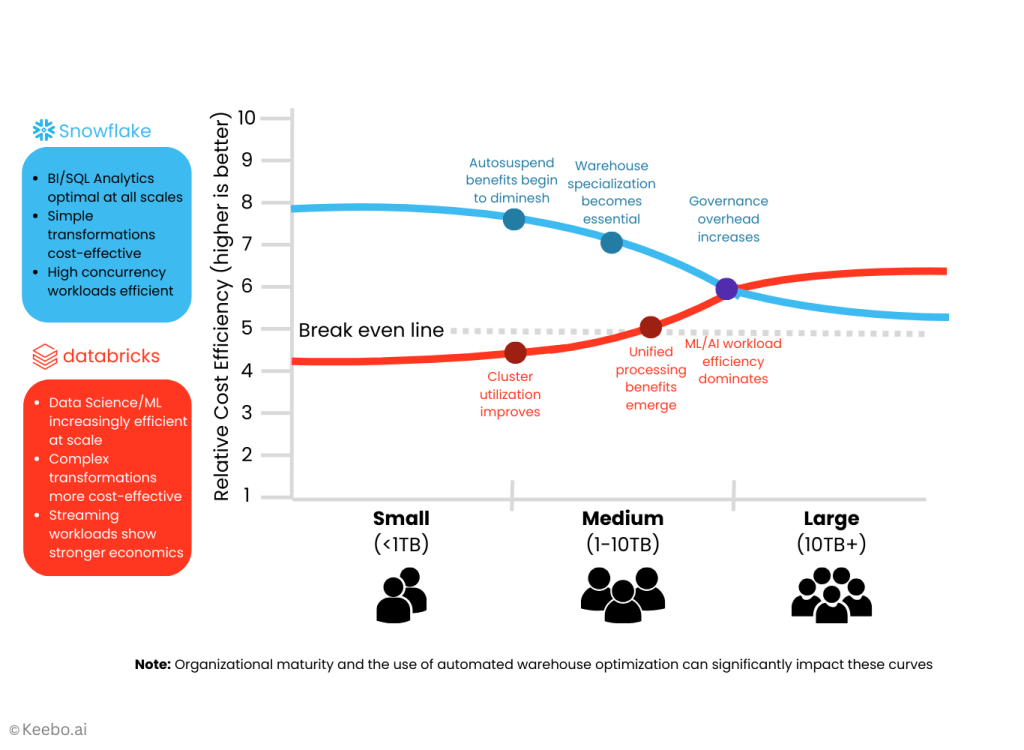
The answer: it depends. Neither platform is inherently more cost effective than the other. It all depends on your organization’s environment and specific needs, as the economics of data platforms shift dramatically depending on workload size, usage patterns, and organizational maturity.
The way that I like to think about cost efficiency—and how I advise Keebo customers to do the same—is to look at the minimum efficient scale of each platform. This is the point at which the average costs reach their lowest level.
For Snowflake, it looks something like this:
- Small-scale operations (< 1TB, lightweight queries). Snowflake’s per-second billing and instant auto-suspend features make it cost-effective even for small, sporadic workloads. The platform’s minimal administrative overhead also helps smaller teams achieve value quickly.
- Mid-scale operations (1-10TB, mixed workloads). As data volumes and query complexity increase, Snowflake’s optimization becomes more important. At this scale, organizations typically need to implement more disciplined warehouse sizing and usage patterns.
- Large-scale operations (10TB+, complex ecosystem). At larger scales, Snowflake’s costs can grow substantially if not carefully managed. However, the platform’s elasticity and multi-clustering capabilities allow well-optimized implementations to maintain cost efficiency.
Databricks, however, has a different efficiency curve:
- Small-scale operations (< 1TB, lightweight queries). Databricks typically has a higher minimum operational cost due to compute startup times and baseline configurations. Small or sporadic workloads may face challenges achieving cost-effectiveness.
- Mid-scale operations (1-10TB, mixed workloads). As scale increases, Databricks begins to demonstrate improved economics. Organizations that fully leverage its capabilities for diverse workloads start to see better returns on investment.
- Large-scale operations (10TB+, complex ecosystem). At scale, particularly for organizations with significant data science and ML workloads, Databricks often shows strong cost-performance characteristics due to its optimization capabilities and unified platform approach.
So for pure SQL analytics workloads, Snowflake will often reach cost efficiency earlier than Databricks. For machine learning workloads that require more data, Databricks is the more cost effective choice.
Before you can answer the question of “which is more cost efficient?” you need to have a clear idea of your anticipated usage.
What Are the Major Considerations When It Comes to Switching Platforms?
Organizations sometimes consider migrating between platforms as their needs evolve. Understanding the economic implications of switching is essential if you want to avoid wasting dollars during and after the migration.
It’s important to keep in mind that the cost differences between the two platforms doesn’t represent what you could actually save during the switch. For example, the migration itself comes with its own price tag: data transfer costs, professional services, staff time managing the migration, training, refactoring, and more.
At the same time, organizations will often go into a migration thinking that it’s a clean break, but underestimate the common challenges that arise (this holds true for migrations in both directions):
- Programming language differences
- UDF conversions
- Governance models tuned to one platform’s unique structure
- Tool connectivity
- Performance tuning
- Team familiarity and bias (and potential resistance)
It’s important to approach a migration decision strategically and thoughtfully. Let’s break down how it often plays out for each platform.
From Snowflake to Databricks
- Typically motivated by growing data science and ML requirements
- Migration costs include data movement, query rewriting, and retraining
- Economic benefits often take 6-12 months to materialize
- Skills gap may require additional hiring or training
| Assessment | Catalog existing Snowflake objects, query patterns, and dependencies. |
| Architecture Planning | Design the target Databricks implementation, considering both Delta Lake storage organization and compute patterns. |
| Data Migration | Move data from Snowflake tables to Delta Lake, preserving partitioning strategies where relevant. |
| Query Transformation | Convert SQL queries, considering Databricks SQL dialect differences. |
| ETL/ELT Conversion | Translate Snowflake tasks and procedures to Databricks workflows. |
| Testing and Validation | Ensure data consistency and performance equivalence. |
| Cutover Planning | Implement synchronization during the transition period. |
| Training and Enablement | Upskill team on Databricks concepts and tools. |
From Databricks to Snowflake
- Usually driven by governance requirements or BI/analytics focus
- Migration involves data restructuring and ETL pipeline adjustments
- Governance improvements may deliver rapid ROI for regulated industries
- Typically easier for primarily SQL-based workloads
A migration plan from Databricks to Snowflake often looks like the following:
| Assessment | Identify which Databricks features are used and their Snowflake equivalents. |
| Schema Planning | Design Snowflake database, schema, and table structures. |
| Data Migration | Extract from Delta Lake to Snowflake, preserving table structures. |
| Transformation Logic | Convert Spark code to Snowflake SQL/Snowpark. |
| Procedural Logic | Translate notebooks and workflows to Snowflake tasks and procedures. |
| Security Mapping | Recreate access controls and data protection measures. |
| Performance Validation | Test and optimize for expected workloads. |
| Operational Transition | Shift monitoring and administration procedures. |
Hybrid Approach: An Alternative to A Complete Migration
Rather than pursuing a complete migration, many organizations opt for a hybrid (or multi-data cloud) approach, leveraging each platform for its strengths. Some of the use cases we’ve seen work effectively within organizations include:
- Using Snowflake for enterprise data warehousing and governed analytics
- Leveraging Databricks for advanced analytics, ML, and data science
- Implementing bidirectional data flows between platforms
- Maintaining consistent metadata and governance across environments
For a hybrid approach to work, organizations usually need to work out how to streamline data movement between platforms, adopt a unified metadata management approach, implement consistent security models, and have clear workload routing guidance. This helps prevent duplicate workloads and the overspend that comes with them.
With that in mind, some of the strategies for optimizing the platforms will need to be adapted to a hybrid environment. Think carefully about where you’re placing your workloads, minimize cross-platform data transfer, and have solutions in place to right-size resources on each platform. A hybrid environment is also considerably more complex than using a single platform, so the need for continuous visibility and autonomous optimizations is even stronger.
Bottom line: migration decisions shouldn’t be made based on “which platform is better.” It’s about how the platforms align to your business needs.
How to Decide Whether You Should Use Snowflake or Databricks (or Both)?
After examining architecture, costs, performance, ecosystem integration, and real-world implementations, the critical question remains: how do you determine which platform is right for your specific organization?
Drawing on my experience guiding platform selection processes across a range of industries, I’ve developed a structured decision framework to help navigate this complex choice.
| Requirements Analysis | Document current and anticipated workloads, prioritizing them by business impact. |
| Capability Mapping | Assess how each platform addresses high-priority requirements. |
| Ecosystem Alignment | Evaluate integration with existing investments. |
| Skills Assessment | Honestly evaluate team capabilities versus platform requirements. |
| Proof of Concept | Test critical workloads on both platforms when feasible. |
| Total Cost of Ownership (TCO) Modeling | Develop comprehensive cost models beyond list pricing. |
| Risk Assessment | Identify implementation and operational risks for each option. |
| Roadmap Alignment | Evaluate how each platform’s innovation direction aligns with your strategy. |
In general, Snowflake is the best choice when SQL-based analytics represent 70%+ of your workloads, business intelligence and reporting are primary use cases, high concurrency for diverse business users is essential, and you need to share data across your organization. Likewise, Databricks is the better option when you’re supporting machine learning and data science as your central workloads, you need complex data processing beyond what SQL supports, and you require deep integration with open-source ecosystems.
Other factors that guide this decision include:
- Compatibility with your current cloud providers, other platforms like Tableau or Power BI, data science ecosystems (e.g., SQL vs. Python/R), and team familiarity with warehouse vs. data lake architectural structures.
- The growth trajectory of your company, specifically your projected data volume growth and its impact on economics. Both platforms continue to evolve rapidly, making current limitations potentially less relevant than innovation direction and velocity.
- Alignment between platform capabilities and your current team. Do you have SQL expertise or programming proficiency? How much experience does your team have with statistical knowledge? What skills are available in your local market and for your compensation range?
The most successful platform selections I’ve observed share a common characteristic: they’re driven by business outcomes rather than technology preferences. Starting with the business problems you’re solving, rather than platform features, leads to more durable and successful implementations.
How to Optimize Snowflake vs. Databricks
Whether you choose Snowflake or Databricks, implementation is far from a one-time activity. User activity is in constant flux, which means your workloads will never stay the same. Add to that the fact that the overall demand for data is growing, and you’re inevitably setting yourself up for a situation where you’re going to need to adapt and re-optimize the platform continuously.
So when evaluating each platform, it’s worth it to look at the mechanics involved in optimizing both cost and performance.
Snowflake Optimization
Snowflake’s credit-based (i.e., consumption-based) pricing model rewards careful resource management and workload optimization. The most direct lever for controlling costs is warehouse configuration, which involves:
- Rightsizing warehouses by workloads (e.g., downsizing a L to an S when it’s not experiencing high demand)
- Implementing multi-clustering based on actual concurrency requirements rather than theoretical peaks
- Implementing time-based scaling, scheduling warehouse scaling to match known usage patterns (e.g., month-end processing)
Other levers at your disposal include storage optimization, where you can review Time Travel retention, monitor clone proliferation, and leverage zero-copy cloning to reduce costs over the long term. It’s also important to tune query performance by implementing proper joins, optimizing filter conditions, and monitoring query patterns to identify inefficient queries that consume disproportionate resources. Lastly, there are several Snowflake native features and third-party tools to monitor and govern credit usage, which can also help you keep costs under control.
One factor to treat judiciously is Snowflake’s Capacity credits, where you can pre-purchase credits at a discounted rate. Although organizations prefer this approach to help keep costs stable, it’s easy to over-provision (paying for credits you never use) or under-provision (paying for too few and then having to provision more credits at the full rate).
LEARN MORE: Read Keebo’s comprehensive guide to Snowflake Cost Optimization.
Databricks Optimization
Databricks requires a different optimization approach from Snowflake due to its different architectural structure. Specifically, Databricks optimization focuses more on compute management and job orchestration.
Organizations that implement comprehensive compute optimization typically reduce infrastructure costs by 30-45%. These practices typically include:
- Rightsizing driver and worker nodes, matching instance types to workload characteristics
- Implementing appropriate autoscaling by configuring minimum and maximum nodes based on workload variability
- Using compute policies to create governance guardrails for instance types and configurations
The other approach to Databricks optimization that organizations often implement is job scheduling optimization. This can reduce the compute resources required to operate your instance by 25-35%, and includes the following:
- Configuring job-specific compute resources instead of using all-purpose compute for scheduled work
- Structuring complex workflows with appropriate dependencies to prevent unnecessary processing
- Aligning job timing with workload schedules minimize resource competition
- Tracking job performance to identify optimization opportunities
In addition to these two primary tactics, Databricks users can realize additional cost savings and performance boosts by partitioning their data, pruning those partitions, using appropriate file sizes, and implementing governance controls for compute configuration.
Lastly, comprehensive and continuous monitoring can help to track DBU consumption across compute and workspaces. This can help you spot resource-intensive workloads and queries so you can fix them.
Cross-Platform Optimization for Hybrid Implementations
Organizations running both platforms benefit from harmonized optimization strategies:
- Unified monitoring: Implement consistent observability across platforms
- Workload placement guidelines: Develop clear criteria for platform selection by workload type
- Consolidated governance: Create overarching policies that span platforms
- Synchronized scaling: Coordinate resource allocation across environments
- Shared knowledge management: Transfer optimization insights between platform teams
Optimization should be viewed as an ongoing practice rather than a one-time project. The most successful organizations embed optimization into their regular operations through:
- Weekly reviews of consumption patterns and anomalies
- Monthly optimization sprints targeting highest-impact opportunities
- Quarterly architecture reviews to align platform configuration with evolving needs
- Annual benchmarking against industry standards and best practices
Regardless of which platform you select, a disciplined approach to optimization typically delivers 5-10x returns through reduced platform spending and improved productivity.
Snowflake vs. Databricks: Which is Better?
If you’ve read this article to the end, you probably know what I’m going to say: neither Snowflake or Databricks is the better platform. The one you use depends entirely on your organization’s specific needs. And more than anything, you should choose the platform that best matches your team’s skills and capabilities. Otherwise, no one will use it.
Another factor that should be top of mind when choosing a cloud platform is the cost. In my experience, I’ve seen many organizations run into unexpected costs when they make decisions without fully understanding each platform’s pricing model and the hidden costs they contain.
Teams also should consider performance: both platforms can deliver strong performance, but one may support your typical workloads better than the other.
The reality I’ve observed across implementations is that the quality of execution ultimately matters more than platform selection. As such, it’s important to choose the platform that you can have the most success at implementation.
How to Unlock Data Cloud Efficiency With Keebo
If you want to set yourself up for the strongest implementation possible, one that helps you avoid excessive hidden costs without sacrificing performance, Keebo can be in your corner from day one.
Keebo Warehouse Optimization reads metadata only, watches how your workloads behave, and automatically adjusts compute settings like warehouse size and auto-suspend as demand changes. No code changes, no query rewrites, and you set the SLA limits it works within. Customers save 27% on average whether they’re on Snowflake, Databricks, or both.
Let us help optimize your data cloud, regardless of which platform you choose.