How Top Snowflake Customers Optimize Costs

Many Snowflake customers still rely on manual processes to reduce costs. This makes optimization an ideal use case for AI and automation.
Snowflake recently released on-demand sessions from the 2023 Summit. AI was the headline theme, including sessions on LLMs and generative AI. However, it was not the most discussed topic overall.
More sessions focused on cost savings than AI, especially on optimizing Snowflake usage. This signals a clear priority. While AI matters long term, reducing costs is an immediate concern for most customers.
You do not need to choose between AI and cost savings. You can achieve both today. In this article, I summarize optimization processes shared at Snowflake Summit and highlight key best practices. I also explain where these approaches fall short and how AI can improve them. For many teams, cost reduction can be their first practical AI use case.
Before reviewing optimization processes, it helps to focus on the primary cost driver. There are many areas to optimize in Snowflake, but one stands out for most teams.
The Top Way To Reduce Snowflake Costs
Start by setting the right warehouse size. This is the most important factor in controlling Snowflake costs.
How Snowflake Data Warehouse Sizes Work
Warehouse size refers to compute power, not storage. Larger warehouses process queries faster and support more complex workloads. Your goal is to meet performance requirements without over-provisioning.
| Warehouse size | Credits per hour (cost) |
| X-small | 1 |
| Small | 2 |
| Medium | 4 |
| Large | 8 |
| X-large | 16 |
| 2X-large | 32 |
| 3X-large | 64 |
| 4X-large | 128 |
| 5X-large | 256 |
| 6X-large | 512 |
Warehouse Size And Snowflake Cost
Costs double with each increase in warehouse size. This is why warehouse sizing is central to cost optimization. Choose a size that efficiently handles most queries while meeting SLAs. Sizing based on your biggest query would mean you are paying too much, since most of the time you will be paying for an underutilized warehouse. If a warehouse is undersized, queries may spill to storage. This slows execution and can lead to failures. The result is poor performance and frustrated users.
Increasing warehouse size improves performance, but it also increases cost. The tradeoff is more complex than it appears and requires careful tuning.
Top Snowflake customers rely on repeatable processes to optimize warehouse size. These processes must adapt as workloads change over time.
A 3-Step Process For Snowflake Optimization
In the presentations I watched, not every customer does exactly the same thing, but there are common themes. I’ve summarized all the best practices into a 3-step process.
Step 1: Write Good Queries
If your queries are not optimized to begin with, there is little you can do to optimize Snowflake and save money. Optimized queries require less compute and allow for smaller, cheaper warehouses. So with an eye on optimizing warehouse size, I categorize the query optimization advice from Snowflake Summit like this:
- Process as little data as possible. But the fewer columns you choose, the better for performance and thus for cost.
- Avoid common SQL mistakes. There are many different ways to achieve the same results with SQL. The technique you choose can use a lot of processing time and drive up your costs. We’ve compiled a list of the top 7 SQL mistakes we see Snowflake customers make.
- Be careful with clustering. Snowflake stores your data in micro-partitions. The more partitions you need to scan for your query, the slower and thus costlier the query becomes. By default, Snowflake stores your data in the order it was ingested. This results in a sort of “natural cluster” where all your recent data is grouped together by time. This works well as most queries are narrowing down the data (pruning) by a time period. So you should be hesitant to change this unless you have special circumstances, such as querying by event from streaming data.
In addition to these basic categories, some Snowflake customers report great results from materialized views. This is a subject I hope to cover in future articles, but let’s keep the focus here on the overall process Snowflake recommends for optimizing warehouse size.
Step 2: Monitor Key Performance Parameters
Effective optimization requires measuring performance. The customers that presented at Snowflake Summit certainly took this to heart. Each of them created custom dashboards using Snowsight (the online SQL tool for Snowflake) to measure several different performance metrics. You could also use Snowflake’s Query Profile that is available in the classic console. Again, with an eye toward warehouse size optimization, the most common query performance metrics are:
| Bytes scanned | In general, the higher the bytes scanned to answer a query, the larger the warehouse needed. If most queries scan less than a GB you probably only need a small or extra small warehouse. |
| Execution time | If this is high, it indicates expensive (long-running) queries. You need to either optimize these queries or scale-up to a larger warehouse. |
| Query load percent | If this is less than 50 for a query, it should be moved to another warehouse or you could increase the warehouse size. |
| Bytes spilled to local and bytes spilled to remote | This indicates the warehouse is undersized. Bytes that can’t fit into memory “spill” to storage. This will be slow on local storage and even slower on remote storage. |
| Queued time | A query that is competing with others for resources will have a high queued time. Increase warehouse size or move queries to a less utilized warehouse. |
There are many other parameters you can measure (again, a subject for a different day) and most of the customers presented dashboards that looked at big picture items too, such as credits used (spend) per warehouse and account.
Step 3: Make Warehouse Size Optimizations
Once you start tracking performance metrics, you have the data you need to begin making adjustments. Since warehouse size was always brought up as the most important optimization factor, let’s look at that as our example here.
One of the key parameters to track is bytes scanned. You can then translate that to recommendations for warehouse size. The following chart was shown several times at Snowflake Summit:
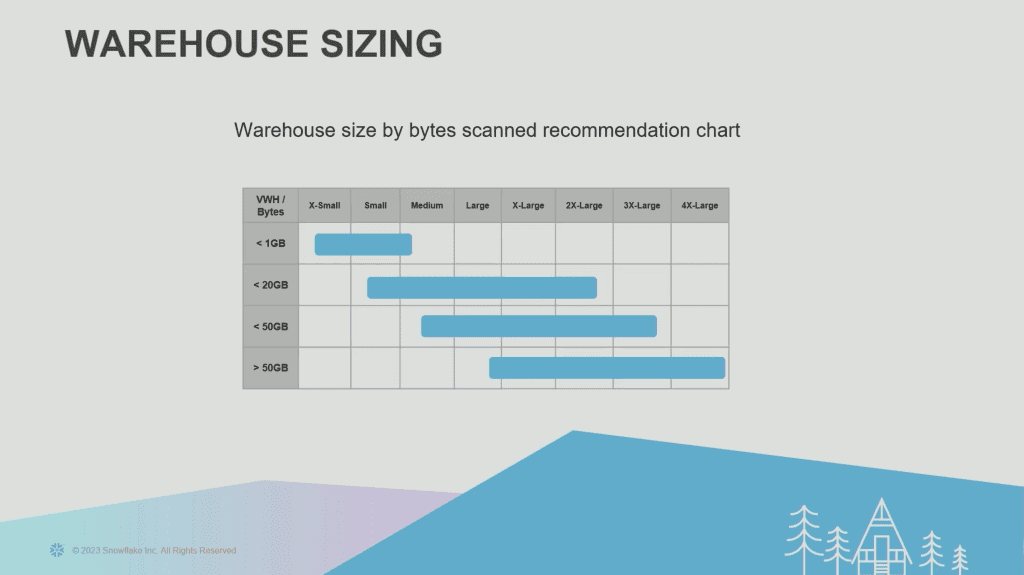
So if your bytes scanned is between 1-20GB, the recommendation is either a small, medium, large, x-large or 2x-large warehouse. This guidance is helpful but lacks specificity. Unfortunately, that can’t be determined since query workloads vary wildly. Even in Snowflake’s own documentation, the advice is to experiment until you find the ideal size: “Experiment by running the same queries against warehouses of multiple sizes (e.g. X-Large, Large, Medium). The queries you experiment with should be of a size and complexity that you know will typically complete within 5 to 10 minutes (or less).”
Any Google search on the subject of Snowflake warehouse sizing will reveal essentially the same advice. But you can cut down on the guesswork by building and monitoring a report that will show you key metrics like those mentioned above.
The Trouble With Optimizing Snowflake
Let’s summarize what we’ve learned so far.
- Create optimized queries to begin with
- Monitor several key parameters for warehouse size
- Use the data to optimize the warehouse size
If you came to this article hoping to save money on Snowflake, this can seem like a helpful place to begin. This process can quickly become difficult to sustain. There are two challenges we need to resolve to make this sustainable.
Resources
We’ve only examined what you need to do to optimize one key parameter: warehouse size. While this is critical for you to do, there are lots of other important parameters as well, such as suspension and clustering. And entire books can be written about other topics like optimizing data ingestion and queries.
Who is responsible for managing this process? Someone needs to ensure optimum queries, create and monitor performance results, and then adjust the warehouse size. Even large teams struggle to maintain this level of optimization. But even for those large teams, their efforts are better spent on other tasks, particularly building data pipelines and directly supporting the analytics needs of the business.
The bigger question is why this effort is required at all. If ever there was a use case for AI and robotics in the Snowflake world, this would be it.
Constant Change
Even if you build a team to optimize Snowflake, or make time to do it yourself, you still face another challenge: you’ve only optimized to the workload you have now. When your workload changes, the optimizations you spent so much time on could become instantly irrelevant.
How Keebo’s AI Automates Snowflake Optimization
The way to solve the resourcing issue and the quandary posed by a dynamic environment is to use automated systems. Allow me to explain how Keebo works.
Always Watching
I listed 5 key parameters earlier in this article. Keebo monitors 76 Snowflake usage metadata fields and we monitor them constantly. It’s important to note that we only access usage metadata, never your user or business data. We then train our proprietary machine learning algorithms on this data to make predictions and constantly optimize your warehouse.
Always Optimizing
Not only do we optimize the most important parameter, warehouse size, we optimize warehouse suspension and clustering, too. You set how aggressive you want our robots to be in finding savings, and then we do the work, freeing up your time. This screenshot shows the optimizations we are doing in real time of just the auto-suspend settings for one week of a customer’s warehouse:
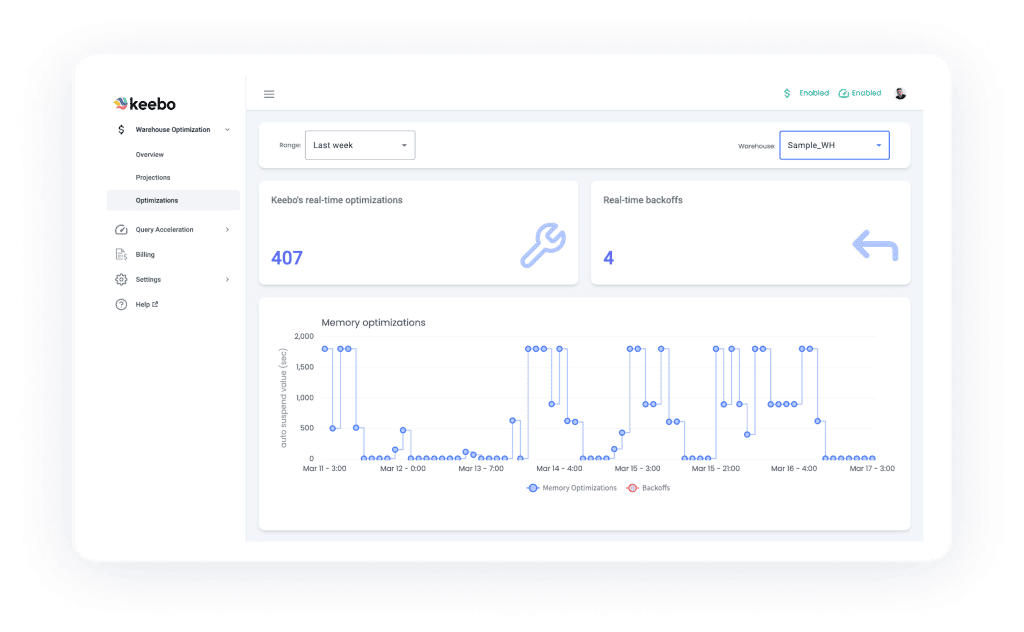
And this works both ways, too–if an optimization turns out to be less than ideal (for example, it is slowing down queries), Keebo will automatically adjust, no matter the day or time. This is important for you to consider if you are planning to do manual optimizations. If something goes wrong, will you be there to adjust again even if it is the middle of the night or the middle of your hard-earned vacation?
It is important to find a solution that can do the actual optimizations for you. When it comes to step 2 of the optimization process–monitoring key performance parameters–there are plenty of products on the market that can show you reports and dashboards instead of building them yourself. But Keebo is the only fully-automated solution that goes beyond “observe and report” to do step 3 for you–the actual work.
Price Is Based On Savings
I mentioned earlier that we shouldn’t have to spend money and time to save money and time. This is the spirit behind Keebo’s pricing. Our price is based on how much we save you. We take a percentage of the money you save on Snowflake–a third or less–meaning Keebo will pay for itself in addition to putting a lot of money back into your pocket.
You can see what our own customers have to say in our collection of customer stories. If Keebo fits your needs, explore our evaluation guide and product demos. We offer a free trial as well to get you on your way.