

Table of Contents
- Introduction
1.1 Key Decision Criteria at a Glance
1.2 How to Read This Guide
1.3 Chapter Overview - What Databricks SQL is today (and what’s actually new)
- Pricing models and how to compare costs credibly
- Migration Patterns & SQL Conversion Guide
4.1 Common Migration Scenarios
4.2 SQL Syntax Conversion Reference
4.3 Snowflake-Specific Features and Databricks Equivalents
4.4 Migration Tools and Automation
4.5 Common Gotchas and Solutions
4.6 Migration Decision Framework
4.7 Migration Effort Distribution - Feature areas to check in a Databricks SQL vs. Snowflake bake-off
5.1 Performance & concurrency
5.2 Pipelines for SQL users
5.3 Programmability & SQL semantics
5.4 Governance defaults
5.5 Data sharing & interoperability
5.6 BI connectivity & tooling
5.7 Observability & reliability - Performance Optimization Deep Dive
6.1 Databricks SQL Optimization Techniques
6.2 Photon Engine Specifics
6.3 Query Optimization Differences
6.4 Platform-Specific Caching Strategies
6.5 Caching Best Practices Comparison
6.6 Automated Warehouse Optimization with Keebo
6.7 Idle Time Optimization
6.8 Monitoring and Tuning - What this means for Snowflake-first teams
7.1 Coexistence is normal, not a failure mode
7.2 Where Databricks SQL tends to fit
7.3 Where Snowflake often remains the default
7.4 Connector and governance reality check
7.5 Open-table strategy matters - Side-by-Side: Databricks SQL vs. Snowflake for BI Workloads
8.1 Engine and compute posture
8.2 Startup, caching, and concurrency
8.3 Cost model implications
8.4 Pipelines for SQL-led teams
8.5 Programmability and SQL semantics
8.6 Governance defaults
8.7 Sharing and ecosystem
8.8 BI connectors and day-one usability
8.9 Operations and observability
8.10 What to do with all of this - A Short Evaluation Playbook (2–3 Weeks of Tests)
9.1 Week 0 — Define scope & normalize the ground rules
9.2 Week 1 — Stand up environments & instruments
9.3 Week 2 — Run the tests (cold & warm)
9.4 Week 3 — Decide with thresholds, not vibes - Pricing reality check
10.1 Define the unit you care about
10.2 Snowflake: compute the true run time and features in play
10.3 Databricks SQL: translate DBUs and tier into workload cost
10.4 Convert performance into dollars
10.5 Watch out for these pitfalls that can skew your cost comparisons
10.6 Sanity-check with a stress scenario - Cost Optimization Strategies
11.1 When to Use Classic vs Pro vs Serverless
11.2 Auto-scaling Best Practices
11.3 Cost Anomaly Detection
11.4 Real-World Cost-Saving Techniques - Governance & Connector Readiness Checklist
12.1 Identity & access (day-one parity)
12.2 Row/column security & data classification
12.3 Governance defaults that affect BI
12.4 Network & security posture
12.5 BI connectors & modeling
12.6 SQL semantics & session settings
12.7 Pipelines that feed BI
12.8 Observability & cost guardrails
12.9 Validation ritual (takes 30 minutes) - Common pitfalls in Databricks SQL pilots and how to avoid them
- What we know vs. what we don’t (2025 numbers to treat carefully)
14.1 Public, Verifiable Data Points
14.2 Data to Treat Cautiously - Decision framework & next steps for Snowflake-first teams
15.1 Decision Framework
15.2 Workload Scoring Guide
15.3 Implementation Sprint
15.4 Proven Adoption Patterns
15.5 Executive Summary Template - Conclusion: Your Path Forward
16.1 90-Day Action Plan
16.2 Databricks SQL Adoption Maturity Model
16.3 Maturity Model Visualization
16.4 Future Roadmap Considerations
16.5 Key Principles for Success
1. Introduction
Our internal analysis of enterprise accounts shows that roughly 42% of Snowflake customers also use Databricks. Historically, though, the share that uses Databricks SQL specifically for warehouse/BI workloads has been significantly lower, and that’s exactly what’s changing. Over the last year, Databricks has reported rapid adoption of its warehouse offering (more on what it is below), and Snowflake‑first teams are beginning to pilot it for well‑scoped SQL workloads.
Two recent data points explain the momentum:
- Databricks disclosed “8,000+ customers using Databricks SQL as their data warehouse” (Sept 2024) and has continued to ship sizable engine gains since then, including a ~5× improvement since launch and a further ~25% boost from features like Predictive Query Execution and Photon Vectorized Shuffle (Databricks blog, engineering update).
- On the business side, Databricks recently surpassed a $4.8B revenue run‑rate and is growing 55%+ YoY (press release, Reuters). Reporting also indicates the company expects Databricks SQL to reach a >$1B run‑rate by the end of its FY Jan 2026 (Bloomberg).
Why this matters for Snowflake-first teams: with Databricks SQL gaining steam, the question is less “switch or stay?” and more where does it make sense alongside Snowflake, for which workloads, at what price/performance, and under which governance defaults. That’s the focus of the rest of this post.
BTW, quick terminology so we’re aligned: Databricks SQL is Databricks’ warehouse experience (SQL Warehouses, including Serverless, with built‑in SQL editor/dashboards and BI connectivity). Spark SQL is the SQL surface inside Apache Spark you run on clusters for code‑heavy pipelines. This article is about Databricks SQL.
I have decided to write up this guide to cover the technical differences that actually matter, the pricing dynamics that are easy to get wrong, and a structured approach to running a fair bake-off. Whether you conclude that Databricks SQL belongs in your stack or that Snowflake remains the right choice, you’ll finish with a defensible recommendation.
1.1 Key Decision Criteria at a Glance
Before diving into 25+ pages of technical detail, it helps to know which factors tend to drive the decision. In my experience working with data teams across industries, five criteria account for most of the signal:
| Criteria | Favors Databricks SQL | Favors Snowflake |
| Lakehouse investment | Already on Delta Lake or moving to open table formats | Deeply integrated with Snowflake ecosystem |
| Workload profile | Large-scale ETL + BI on same platform | Primarily BI/analytics with established pipelines |
| Cost sensitivity | Negotiable DBU pricing; bursty workloads | Predictable credit consumption; steady-state |
| Governance maturity | Unity Catalog adoption underway | Snowflake RBAC/masking fully deployed |
If you already know where you land on most of these, you can skim the relevant sections and jump to the decision framework in Section 15. If the answer is “it depends” or “we’re not sure,” the detailed sections will help you build the evidence you need.
1.2 How to Read This Guide
This is a long document, and not every section is relevant to every reader. A FinOps lead evaluating cost trade-offs needs different information than an architect planning a migration or an executive deciding whether to greenlight a pilot.
Here’s a suggested reading path based on your role:
| Role | Start Here | Key Sections | Time |
| Executive / VP | 1.2 Decision Criteria → 7 (What This Means) → 15 (Decision Framework) → 16 (90-Day Plan) | Strategic context, decision triggers, action plan | 20 min |
| Data Architect | 3 (Pricing) → 4 (Migration) → 5 (Feature Bake-Off) → 6 (Performance) → 12 (Governance Checklist) | Technical depth, migration patterns, architecture trade-offs | 60 min |
| BI Analyst / Developer | 4.2 (SQL Conversion) → 8 (Side-by-Side) → 9 (Evaluation Playbook) → Appendix A | Day-to-day SQL differences, connector behavior, hands-on testing | 30 min |
| FinOps / Cost Owner | 3 (Pricing) → 10 (Pricing Reality Check) → 11 (Cost Optimization) | Unit economics, anomaly detection, optimization levers | 30 min |
Of course, you can also read straight through. The sections are designed to build on each other, with earlier sections providing context that informs later recommendations.
1.3 Chapter Overview
For reference, here’s what each major section covers:
| Section | What It Covers |
| 2 | What Databricks SQL is today and recent performance improvements |
| 3 | Pricing models — credits vs. DBUs and how to compare fairly |
| 4 | Migration patterns and a SQL conversion reference |
| 5–6 | Feature comparison and performance optimization deep dive |
| 7–8 | Strategic implications and side-by-side BI workload analysis |
| 9–10 | A 2–3 week evaluation playbook and pricing reality check |
| 11 | Cost optimization strategies including warehouse tiers and auto-scaling |
| 12–13 | Governance/connector checklist and common pilot pitfalls |
| 14–15 | Data reliability notes and decision framework with scoring |
| 16 | Conclusion: 90-day action plan and maturity model |
| Appendices | SQL conversion cheat sheet and configuration templates |
With that context in place, let’s start with the current state of Databricks SQL and what’s actually changed.
2. What Databricks SQL is today (and what’s actually new)
Databricks SQL is the warehouse experience on Databricks: analysts connect to SQL Warehouses (Classic/Pro/Serverless), query data with a built‑in SQL editor, and publish dashboards/alerts with standard ODBC/JDBC connectivity for BI tools. Under the hood, the Photon engine is on by default for SQL Warehouses, and Serverless removes cluster management and auto‑scales for interactive workloads (product overview, SQL Warehouses, Photon, Serverless).
A few practical aspects Snowflake‑first teams should know:
- Governance defaults. SQL Warehouses are Unity Catalog–compliant by default, so permissions, row/column controls, lineage, and auditing behave consistently for BI users without special cluster modes (Unity Catalog).
- Performance trajectory. Databricks reports that typical Databricks SQL workloads are ~5× faster than at launch, with an additional ~25% from recent features such as Predictive Query Execution and Photon Vectorized Shuffle, rolled out automatically on Serverless (5× in three years).
- Programmability for SQL users. Beyond the editor and dashboards, Databricks has added SQL stored procedures and SQL scripting, which let teams implement warehouse‑side logic without leaving SQL (stored procedures, SQL scripting).
- Pipelines, without a separate ELT stack. Materialized views and streaming tables keep derived tables fresh using SQL‑declared policies, useful for near‑real‑time BI and incremental transforms (materialized views, streaming tables).
- AI/BI accelerants. The Databricks AI/BI initiative (including Genie for natural‑language‑to‑SQL) aims to shorten time from question to query while keeping governance under Unity Catalog (AI/BI & Genie).
What this means if you’re Snowflake‑first: Databricks SQL is no longer “just Spark with a SQL layer.” It’s a warehouse‑style surface with serverless elasticity, opinionated governance defaults, and fast‑moving engine work aimed at BI concurrency. In the next sections, we’ll compare pricing models, call out the feature areas that matter in a bake‑off, and outline a short evaluation plan to decide where, if anywhere, Databricks SQL belongs alongside Snowflake in your stack.
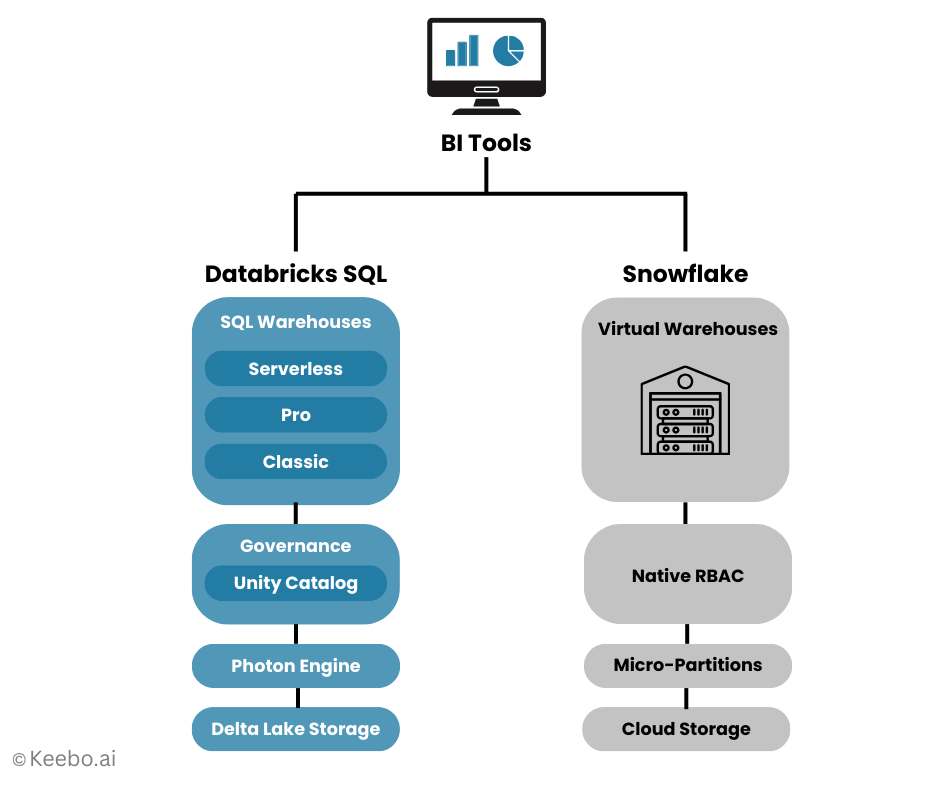
3. Pricing models and how to compare costs credibly
Before you run any bake‑off, align on how each platform charges for SQL and what that means for real workloads.
Snowflake (credits): Warehouses bill per‑second with a 60‑second minimum each time a warehouse starts or resumes. Size determines the credit burn‑rate; multi‑cluster mode can add cost to preserve concurrency; Auto-suspend minimum 1 second but rounds up to next 30-second interval – you set 45s, Snowflake bills 60s idle (suspension process polls every ~30s); features like Query Acceleration Service and Search Optimization can also affect the bill. See Snowflake’s docs on warehouse billing, per‑second compute, and concurrency/acceleration.
Databricks SQL (DBUs): Databricks charges in pay-per-second DBUs (1-second minimum for SQL Warehouses). For Databricks SQL Serverless, the DBU rate bundles the cloud compute, so you don’t separately pay for VMs (minimal auto-stop: 5 min in UI, 1 min via API); Pro/Classic SQL Warehouses bill DBUs plus your underlying cloud instances (minimal auto-stop: 10 min in UI and via API). Idle time before auto-stop still incurs DBUs (and cloud instance costs on Pro/Classic). See the official pages for Databricks SQL, DBU definition, and Serverless SQL Warehouses.
Why list prices mislead: The effective cost of a SQL workload is dominated by startup latency, caching behavior, and concurrency management. A service that spins up quickly and serves more queries from cache can be cheaper at the same or even higher list rate; conversely, aggressive concurrency settings or long‑running warehouses can erase headline savings.
To ensure fair comparison between platforms, follow this evaluation approach:
- Pick 3 representative workloads: (1) a live BI dashboard (50–200 concurrent sessions), (2) ad‑hoc exploration with joins/filters, and (3) a daily ELT SQL step.
- Measure both cold and warm: Capture cold‑start latency, p95 query time, throughput at target concurrency, queueing/burst behavior, and cache hit rates.
- Calculate fully loaded cost: On Snowflake, include warehouse size, run time (with the 60‑second minimum), and any acceleration features. On Databricks SQL, account for the DBU rate (Serverless bundles compute; Pro/Classic add cloud VMs) and any higher‑tier features you enable.
- Keep governance equivalent: Align role mappings, row/column masking, and security policies so differences you observe are about engines/pricing, not permissions.
- Document semantics: Note ANSI behavior, casting, and NULL/overflow differences so you don’t confuse correctness issues with cost/perf.
Up next, we’ll look at the feature areas that matter most in a Databricks SQL vs. Snowflake bake‑off and where teams are seeing the biggest deltas in practice.
4. Migration Patterns & SQL Conversion Guide
When evaluating Databricks SQL alongside Snowflake, understanding migration patterns and SQL differences helps you assess the real effort required. This section covers practical migration scenarios, common syntax differences, and conversion strategies.
4.1 Common Migration Scenarios
Scenario 1: Read-Only BI Dashboard Migration Start with dashboards that only query data without writes. This minimizes risk while you validate performance and user experience.
Migration steps:
- Export dashboard definitions and queries from your BI tool
- Create equivalent views in Databricks SQL with Unity Catalog permissions
- Update connection strings to point to Databricks SQL Warehouse
- Run parallel testing for 1-2 weeks comparing results and performance
- Cut over during a maintenance window with fallback plan ready
Scenario 2: ETL Pipeline with SQL Transformations For SQL-based transformations currently in Snowflake Tasks/Stored Procedures:
- Convert Snowflake Tasks to Databricks SQL scheduled queries or workflows
- Replace Snowflake Streams‑based CDC pipelines with Databricks Lakeflow Spark Declarative Pipelines (formerly Delta Live Tables) or Streaming Tables that consume Delta Change Data Feed.
- Map stored procedures to Databricks SQL procedures (syntax differences below)
- Test incremental processing logic carefully – semantics may differ
- Run both pipelines in parallel until output validation completes
Scenario 3: Hybrid Approach – Keep Core, Move Edge Most practical for large estates:
- Keep core fact/dimension tables in Snowflake
- Move departmental marts or specific subject areas to Databricks SQL
- Use external tables or data sharing for cross-platform access
- Start with workloads that benefit from Delta Lake features or ML integration
4.2 SQL Syntax Conversion Reference
While both platforms support ANSI SQL, key differences require attention:
Date/Time Functions
-- Snowflake

SELECT DATEADD(day, 7, current_date);

SELECT DATEDIFF(day, start_date, end_date);

-- Databricks SQL

SELECT DATE_ADD(current_date, 7);

SELECT DATEDIFF(end_date, start_date);
String Functions
-- Snowflake

SELECT LISTAGG(name, ',') WITHIN GROUP (ORDER BY name);

SELECT SPLIT_PART(email, '@', 1);

-- Databricks SQL

SELECT STRING_AGG(name, ',' ORDER BY name);

SELECT SPLIT(email, '@')[0];
Window Functions
-- Snowflake (QUALIFY clause)

SELECT * FROM sales

QUALIFY ROW_NUMBER() OVER (PARTITION BY customer ORDER BY date DESC) = 1;

-- Databricks SQL (use subquery)

SELECT * FROM (

  SELECT *, ROW_NUMBER() OVER (PARTITION BY customer ORDER BY date DESC) as rn

  FROM sales

) WHERE rn = 1;
Semi-Structured Data
-- Snowflake

SELECT data:customer.name::string as customer_name

FROM json_table;

-- Databricks SQL

SELECT data.customer.name as customer_name

FROM json_table;
4.3 Snowflake-Specific Features and Databricks Equivalents
| Snowflake Feature | Databricks SQL Equivalent | Migration Notes |
| Snowpipe | Auto Loader + Streaming Tables | Databricks is a continuous stream; Snowflake is event-driven file batching. Requires workflow setup (often DLT/Jobs). |
| Time Travel | Delta Time Travel | Syntax: `VERSION AS OF` or `TIMESTAMP AS OF`. Retention is configurable (default 7/30 days); ensure it matches Snowflake’s setting. |
| Zero-Copy Cloning | Delta Deep Clone | Deep Clone copies data files, unlike Snowflake’s metadata-only approach. Expect a different performance and storage profile for the first clone. |
| Tasks | Databricks Workflows/Jobs | Workflows support multi-language (SQL, Python) and multi-step orchestration, offering more options than SQL-based Tasks. |
| Streams | Change Data Feed (CDF) | CDF must be explicitly enabled on the Delta table; it is the source of change data, which is then consumed by a Streaming Table or DLT pipeline. |
| Dynamic Tables | Delta Live Tables (DLT) or Materialized Views (MVs) | DTs map best to DLT pipelines for multi-step dependencies. MVs are better for single-step aggregation and run on a simple scheduled refresh. |
| Query Acceleration | Predictive I/O + Caching | Automatic on Serverless. Databricks Photon engine is the primary driver for performance optimization. |
4.4 Migration Tools and Automation
Before beginning conversion, use these tools to scope the work:
- Query Logs: Use query logs (e.g., Snowflake’s QUERY_HISTORY) to identify top-cost queries, frequently run logic, and pattern usage.
- Export Snowflake ACCOUNT_USAGE: Analyze function frequency to determine the most common non-ANSI functions (DATEADD, LISTAGG, etc.) for prioritized automation.
- Script to Scan: Write or use a dedicated utility to scan all SQL files and code repositories for non-ANSI constructs (like QUALIFY or SPLIT_PART).
Conversion Automation Basic Python script structure for query conversion:
# Example pattern matching for common conversions

conversions = {

    r'DATEADD\((\w+),\s*(\d+),\s*(.+?)\)': r'DATE_ADD(\3, \2)',

    r'LISTAGG\((.+?),\s*(.+?)\)\s*WITHIN GROUP': r'STRING_AGG(\1, \2)',

    r'::(\w+)': r' AS \1'  # Cast syntax

}
Testing Framework
- Capture query results from both platforms
- Compare row counts, data types, and sample values
- Validate numeric precision differences
- Check NULL handling variations
4.5 Common Gotchas and Solutions
Issue: Timestamp precision differences
- Snowflake: Nanosecond precision by default
- Databricks: Microsecond precision
- Solution: Explicitly cast to matching precision
Issue: Case sensitivity in string comparisons
- Snowflake: Case-insensitive by default
- Databricks: Case-sensitive
- Solution: Use LOWER() for consistent behavior
Issue: Division by zero handling
- Snowflake: Returns NULL
- Databricks: Throws error
- Solution: Use NULLIF or TRY_DIVIDE
Issue: VARIANT column type
- Snowflake: Native VARIANT
- Databricks: Use STRING with JSON functions
- Solution: Refactor to structured columns where possible
4.6 Migration Decision Framework
Before migrating any workload, evaluate:
- SQL Complexity Score
- Low (0-3): Basic SELECT, simple JOINs
- Medium (4-6): Window functions, CTEs, basic UDFs
- High (7-10): Complex stored procedures, streams, tasks
- Data Volume and Velocity
- Static reference data: Easy migration
- Daily batch updates: Moderate complexity
- Real-time streaming: Requires architecture changes
- Feature Dependencies
- List Snowflake-specific features in use
- Identify Databricks SQL equivalents
- Estimate refactoring effort
- Business Criticality
- Start with non-critical workloads
- Build confidence before moving core systems
- Always maintain rollback capability
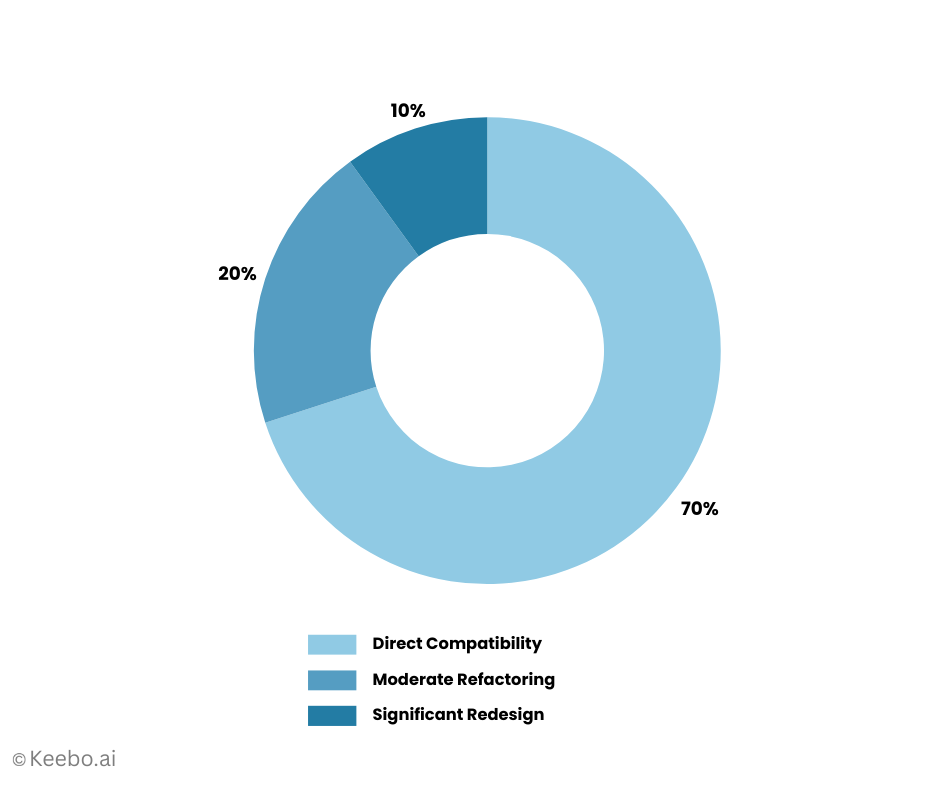
Migration effort typically follows this pattern:
- 70% of queries: Direct compatibility or minor syntax changes
- 20% of queries: Moderate refactoring for functions/semantics
- 10% of queries: Significant redesign needed
Focus initial efforts on the 70% to build momentum, then tackle complex cases with lessons learned.
4.7 Migration Effort Distribution
5. Feature areas to check in a Databricks SQL vs. Snowflake bake‑off
Below are the capability buckets most Snowflake‑first teams evaluate when they pilot Databricks SQL. Each item includes a quick “what to look for” and a doc link for the feature on each platform.
5.1. Performance & concurrency
- Databricks SQL: Photon is on by default for SQL Warehouses and recent engine work such as Predictive Query Execution and Photon Vectorized Shuffle targets BI‑style concurrency. Measure cold‑start, p95, and burst behavior on Serverless.
- Snowflake: Test multi‑cluster warehouses and Query Acceleration Service under the same workload mix, and watch result cache effects.
5.2 Pipelines for SQL users
- Databricks SQL: Keep derived tables fresh with materialized views and streaming tables (SQL‑declared policies).
- Snowflake: Compare with Dynamic Tables (target freshness, dependencies) and Tasks/Streams.
5.3 Programmability & SQL semantics
- Databricks SQL: Warehouse‑side logic via SQL stored procedures and SQL scripting; newer environments default to ANSI behavior (ANSI_MODE).
- Snowflake: Mature stored procedures and UDFs in multiple languages; confirm any dialect/ANSI differences that might affect migration.
5.4 Governance defaults
- Databricks SQL: Unity Catalog is enforced on SQL Warehouses by default (row/column controls, lineage, tags).
- Snowflake: Native row access policies, masking policies, object tags & governance. Ensure your test maps roles/masks equivalently.
5.5 Data sharing & interoperability
- Databricks SQL: Delta Sharing (open protocol) and Delta Lake UniForm for Iceberg/Hudi metadata compatibility.
- Snowflake: Marketplace and Iceberg tables (managed and externally managed) widen open‑table options.
5.6 BI connectivity & tooling
- Databricks SQL: Native editor, dashboards/alerts, and ODBC/JDBC connectors for Power BI/Tableau/Looker.
- Snowflake: Broad BI connector ecosystem; validate DirectQuery/Live vs. extract modes in each tool.
5.7 Observability & reliability
- Databricks SQL: Review query history & profiles, auto‑scaling behavior on Serverless, and any workload management settings.
- Snowflake: Compare resource monitors, auto‑suspend/resume policies, and warehouse usage views.
To use this comparison effectively: pick 2–3 workloads (e.g., a busy dashboard, ad‑hoc exploration, and a daily ELT step) and score each bullet side‑by‑side. Capture both performance and fully loaded cost, then decide whether Databricks SQL belongs alongside Snowflake for specific SQL workloads, or whether the status quo is already optimal for your environment.
Here’s the new content for “Performance Optimization Deep Dive”. Based on the document structure, this should be inserted after Section 5 (Feature areas to check) and renumbered as Section 6, which means all subsequent sections would need to be renumbered.
6. Performance Optimization Deep Dive
Understanding performance optimization differences between Databricks SQL and Snowflake helps you tune workloads effectively on each platform. While both offer automatic optimizations, knowing platform-specific techniques ensures optimal performance and cost efficiency. Additionally, automated optimization tools like Keebo can dynamically manage warehouse sizing and idle time to maximize savings without manual intervention.
6.1 Databricks SQL Optimization Techniques
File Organization and Layout Databricks SQL leverages Delta Lake’s file organization capabilities for optimal performance:
- Z-Ordering: Co-locate related data in the same files
OPTIMIZE table_name ZORDER BY (customer_id, date);
- Auto-compaction: Serverless warehouses automatically compact small files
- Partition pruning: Use partition columns effectively for date-based queries
- File statistics: Delta maintains min/max statistics per file for efficient skipping
Query Optimization Features
- Adaptive Query Execution (AQE): Dynamically adjusts query plans based on runtime statistics
- Dynamic partition pruning: Filters partitions based on dimension table joins
- Broadcast hash joins: Automatically broadcasts small tables
- Cost-based optimizer: Uses table statistics for optimal join ordering
Best Practices for Databricks SQL
- Maintain fresh table statistics: ANALYZE TABLE table_name COMPUTE STATISTICS
- Use clustering keys (Z-order) for high-cardinality filters
- Partition by low-cardinality columns (typically dates)
- Enable deletion vectors for efficient updates/deletes
- Monitor file sizes and run OPTIMIZE periodically
6.2 Photon Engine Specifics
The Photon engine, enabled by default on SQL Warehouses, provides vectorized execution for dramatic performance improvements:
What Photon Accelerates
- Aggregations and joins (especially on numeric/date columns)
- String processing and regular expressions
- Complex filters and case statements
- Delta Lake operations (merge, update, delete)
- Parquet decoding and encoding
Photon Optimization Tips
- Columnar processing: Structure queries to process columns independently
- Minimize data shuffles: Use broadcast joins where possible
- Leverage native functions: Photon-optimized functions outperform Scala or Python UDFs
- Batch operations: Combine multiple operations in single statements
Monitoring Photon Usage Check query profiles to verify Photon acceleration:
-- In query history, look for "Photon" indicators

-- Photon-accelerated operators show significant speedups
6.3 Query Optimization Differences
Key areas where optimization approaches differ between platforms:
Join Strategies
| Aspect | Databricks SQL | Snowflake |
| Small table joins | Automatic broadcast | Automatic broadcast |
| Join ordering | Cost-based with AQE | Cost-based optimizer |
| Join hints | Supported (BROADCAST) | Limited hints |
| Adaptive replanning | Yes (AQE) | No |
Aggregation Optimization
- Databricks: Partial aggregation pushdown, vector aggregation with Photon
- Snowflake: Automatic micro-partition pruning, result set caching
Predicate Pushdown
- Databricks: File-level statistics, partition pruning, Z-order benefits
- Snowflake: Micro-partition pruning, clustering key optimization
Common Anti-Patterns to Avoid
Databricks SQL:
- Over-partitioning (creates too many small files)
- Neglecting OPTIMIZE on frequently updated tables
- Using Python UDFs instead of native SQL expressions
- Not leveraging Delta Lake features (Z-order, statistics)
Snowflake:
- Ignoring clustering keys on large tables
- Over-using FLATTEN on semi-structured data
- Creating overly wide tables
- Not considering Search Optimization Service for point lookups
6.4 Platform-Specific Caching Strategies
Both platforms use caching, but with different approaches and control mechanisms:
Databricks SQL Caching
- Delta Cache (on non-Serverless warehouses)
- Caches Parquet files on local SSDs
- Configure cache size based on working set
- Monitor cache hit rates via metrics
- Result Caching
- Automatic for identical queries
- Respects data freshness
- No explicit control needed
- Disk Caching with Z-Order
- Z-ordered data improves cache efficiency
- Frequently filtered columns benefit most
- Combine with partitioning for best results
Snowflake Caching
- Result Cache
- 24-hour retention for identical queries
- Automatic invalidation on data changes
- No configuration required
- Metadata Cache
- Speeds up query compilation
- Reduces planning time for complex queries
- Warehouse Cache
- Local disk cache per warehouse
- Cleared on warehouse suspension
- Size based on warehouse size
6.5 Caching Best Practices Comparison
| Strategy | Databricks SQL | Snowflake |
| Warm-up queries | Run after OPTIMIZE | Run after warehouse resume |
| Cache persistence | Survives restarts (Delta cache) | Cleared on suspend |
| Cache sharing | Within warehouse | Within warehouse |
| Manual control | Limited | Limited |
6.6 Automated Warehouse Optimization with Keebo
While manual optimization requires constant monitoring and adjustment, automated solutions like Keebo can dynamically optimize warehouse sizing and idle time management for both platforms, delivering significant cost savings without operational overhead.
Dynamic Warehouse Sizing
Peak loads vary throughout the day, yet most teams provision for maximum capacity and leave it static. This leads to substantial waste during off-peak hours. Keebo automatically addresses this by:
- Continuous Load Monitoring: Tracks actual query patterns and concurrency requirements in real-time
- Intelligent Downsizing: Automatically reduces warehouse size when over-provisioned
- Example: 2XL → Large during periods with lighter workload
- Example: Large → Medium during overnight batch windows
- Proactive Upsizing: Scales back up before peak periods to maintain performance
- Pattern Learning: Adapts to weekly and monthly patterns in your workload
Typical savings from automated sizing: 20-40% reduction in compute costs without impacting performance.
6.7 Idle Time Optimization
Both platforms offer basic auto-suspend options, but gaps in their default settings leave money on the table:
Databricks SQL Auto-Stop Limitations
- Minimum idle time: 10 minutes
- No workload-aware logic
- Same timeout for all warehouse types
- No consideration of upcoming scheduled jobs
Snowflake Auto-Suspend Limitations
- Minimum idle time: 60 seconds (but too aggressive for most workloads)
- No differentiation between warehouse purposes
- Doesn’t consider query patterns
- Can cause excessive stop/start cycles
How Keebo Optimizes Idle Time
Using platform APIs, Keebo implements intelligent idle management:
- Workload-Aware Timeouts: Different idle settings based on warehouse purpose
- Interactive BI: Shorter timeouts (2-5 minutes)
- ETL warehouses: Longer timeouts to avoid restart overhead
- Ad-hoc analysis: Medium timeouts with pattern detection
- Predictive Suspension: Analyzes historical patterns to suspend warehouses before long idle periods
- Detects end-of-day patterns
- Recognizes weekend/holiday schedules
- Anticipates batch job completions
- Smart Resume: Pre-warms warehouses before expected usage
- Reduces cold-start impact on users
- Maintains cache efficiency
- Balances cost vs. user experience
6.8 Performance Monitoring and Tuning
Key Metrics to Track
Databricks SQL:
- File scan efficiency (bytes read vs. rows returned)
- Photon acceleration percentage
- Shuffle data volume
- Task skew in query stages
- Cache hit rates
Snowflake:
- Micro-partition pruning effectiveness
- Compilation time vs. execution time
- Spillage to remote storage
- Queuing time
- Credit consumption per query
Optimization Workflow
- Identify slow queries using query history
- Analyze query profiles for bottlenecks
- Check data layout (partitioning, clustering, file sizes)
- Verify statistics are current
- Test optimization techniques
- Monitor improvement and iterate
The key insight: while both platforms aim for “it just works” performance, understanding their optimization models helps you design schemas and queries that fully leverage each platform’s strengths. Databricks SQL rewards good file organization and Delta Lake features, while Snowflake rewards proper clustering and warehouse sizing. And with automated optimization tools like Keebo, you can achieve optimal performance and cost efficiency without the operational burden of constant manual tuning.
7. What this means for Snowflake‑first teams
7.1 Coexistence is normal, not a failure mode.
Many enterprises now run both platforms; independent survey work has shown meaningful account overlap, so the question isn’t “switch or stay,” it’s where Databricks SQL belongs alongside Snowflake for your specific workloads (overlap context). Use your own metrics, not internet averages, to decide.
7.2 Where Databricks SQL tends to fit.
We see the strongest case when:
- You want warehouse‑style SQL close to existing Spark pipelines or ML features, with Serverless elasticity that removes cluster ops (SQL Warehouses, Serverless compute).
- You’re standardizing governance under Unity Catalog and prefer BI endpoints that are UC‑compliant by default (Unity Catalog overview).
- You care about open table formats and cross‑engine sharing (e.g., Delta Lake UniForm for Iceberg/Hudi metadata compatibility) (Delta Lake UniForm).
7.3 Where Snowflake often remains the default.
If your BI is already tuned around multi‑cluster warehouse concurrency, Dynamic Tables pipelines, and Marketplace‑enabled data/apps, a wholesale move rarely pencils out; instead, pilot specific workloads where you suspect better price/performance (Dynamic Tables, Marketplace).
7.4 Connector and governance reality check.
Before shifting BI traffic, validate the exact path for Power BI/Tableau/Looker (DirectQuery/Live vs. extract), role mapping, masking, and lineage so differences don’t masquerade as engine issues (Databricks BI integrations, Snowflake BI ecosystem). On Databricks SQL, newer environments default to ANSI‑style behavior; confirm semantics early to avoid migration surprises (ANSI mode note).
7.5 Open‑table strategy matters.
If you’re leaning into Apache Iceberg, note that Snowflake now supports managed and external Iceberg tables (with write support) while Databricks pushes open interoperability from the Delta side via UniForm (Snowflake Iceberg overview, Delta Lake UniForm). Your table‑format stance will influence sharing patterns, governance, and the ease of dual‑engine analytics.
Economics: design the test, then trust the numbers. Use a short bake‑off (dashboard concurrency, ad‑hoc BI, one ELT step) and measure cold‑start latency, p95, throughput at target concurrency, cache hit‑rates, and fully loaded cost. Publish the method and results internally so Finance and Engineering can align on where Databricks SQL adds net value next to Snowflake.
8. Side‑by‑Side: Databricks SQL vs. Snowflake for BI Workloads
If you’re deciding where Databricks SQL belongs alongside Snowflake, the most useful lens is the day‑to‑day reality of BI: fast starts, steady p95s under load, predictable costs, and guardrails that don’t surprise analysts at 9 a.m. This section compares the two in plain language, with a few links if you want to dig deeper.
8.1 Engine and compute posture.
Databricks SQL runs BI queries on SQL Warehouses, fully managed pools that can be Serverless for hands‑off elasticity. The Photon engine is the default, so you’re getting vectorized execution for faster joins and aggregations without tuning out of the box (SQL Warehouses, Serverless). Snowflake, by contrast, uses service‑managed virtual warehouses that you size and scale horizontally; its design favors consistent performance with strong isolation between workloads (multi‑cluster warehouses).
8.2 Startup, caching, and concurrency.
For interactive BI, cold‑start and burst behavior drive perceived speed. Serverless SQL Warehouses aim to minimize spin‑up time and scale elastically as sessions surge (scaling behavior). Snowflake relies on auto‑suspend/resume with a per‑resume 60‑second minimum billing window, and it adds capacity via multi‑cluster when concurrency spikes (auto‑suspend/resume & credit usage, multi‑cluster). Both engines lean on result/metadata caches; your job in a pilot is to compare warm vs. cold behavior, not just best‑case cached reads.
8.3 Cost model implications.
Databricks SQL prices in DBUs; Serverless bundles the underlying cloud compute into the DBU rate, while Pro/Classic tiers typically bill DBUs plus VMs (DBU FAQ, Serverless SQL Warehouses). Snowflake bills in credits per second with the 60‑second minimum on each resume; features like Query Acceleration Service can smooth tail latency at additional cost (Query Acceleration Service). In practice, effective cost is a function of startup latency, cache hit‑rates, and how you manage concurrency, not just list prices.
8.4 Pipelines for SQL‑led teams.
Databricks has pushed SQL‑first freshness with materialized views and streaming tables so analysts can keep derived tables current without adopting a separate ELT framework (materialized views, streaming tables). Snowflake’s answer is Dynamic Tables, a declarative way to maintain downstream tables with defined freshness and dependency tracking (Dynamic Tables). Both approaches reduce the “cron‑job menagerie” that creeps into BI estates.
8.5 Programmability and SQL semantics.
Databricks SQL now supports SQL stored procedures and SQL scripting, bringing more warehouse‑side logic into the SQL surface (stored procedures, SQL scripting). Newer SQL Warehouses default to ANSI‑style behavior, which can be stricter than legacy modes (ANSI mode). Snowflake has long offered stored procedures, UDFs, and tasking with ANSI‑aligned semantics; it’s worth sanity‑checking casting, overflow, and NULL behavior before you migrate logic (stored procedures).
8.6 Governance defaults.
A practical difference many teams feel on day one: Unity Catalog is enforced by default on SQL Warehouses, so row/column controls, tags, and lineage are consistent for BI endpoints (Unity Catalog). Snowflake bakes governance into the platform, RBAC, row access policies, masking policies, and object tagging, with a large ecosystem that depends on those constructs (row access policies, masking policies, object tagging).
8.7 Sharing and ecosystem.
If you exchange data often, Databricks offers Delta Sharing (an open protocol) and Delta Lake UniForm to present Iceberg/Hudi‑compatible metadata when you need to interoperate across engines (Delta Sharing, Delta Lake UniForm). Snowflake’s Marketplace remains a powerful distribution channel for ready‑to‑query data, models, and apps (Marketplace), and its Iceberg table options continue to expand (Iceberg tables).
8.8 BI connectors and day‑one usability.
Both platforms support standard ODBC/JDBC connectors for Power BI, Tableau, and Looker. Databricks SQL also includes a built‑in editor, dashboards, and alerts for teams that want a native surface without a separate BI server (BI integrations). Snowflake’s connector ecosystem is deep and battle‑tested across tools and partner apps (Snowflake BI ecosystem).
8.9 Operations and observability.
You’ll want enough introspection to catch hotspots before your users do. Databricks SQL provides query history and profiles, plus Serverless scaling telemetry in the warehouse admin views (monitor queries). Snowflake’s resource monitors and ACCOUNT_USAGE views help you track spend and performance patterns and enforce limits when necessary (resource monitors, ACCOUNT_USAGE warehouses).
8.10 What to do with all of this.
Pick one real dashboard and one ad‑hoc exploration pattern. Run them on both platforms with equivalent governance. Measure cold‑start, p95 under target concurrency, cache hit‑rates, and fully loaded cost (including Snowflake’s 60‑second minimum on resumes and any Databricks Serverless DBU assumptions). If Databricks SQL beats Snowflake for those specific workloads, you’ve found a sensible place to add it; if not, you’ve validated that your current setup is already optimal.
9. A Short Evaluation Playbook (2–3 Weeks of Tests)
If Databricks SQL is on your radar, don’t debate it in the abstract, measure it. This playbook compares actual workload performance on Databricks SQL (Serverless or Pro) and Snowflake under equivalent governance and semantics, then decide where (if anywhere) Databricks SQL belongs alongside your existing Snowflake estate.
Expected outcomes: a side‑by‑side report with p50/p95 latency, concurrency behavior, cold‑start characteristics, cache effects, and fully loaded cost, plus a go/no‑go per workload.
9.1 Week 0 — Define scope & normalize the ground rules
Start by establishing consistent testing parameters across both platforms:
- Pick 3 representative workloads.
- A busy BI dashboard (50–200 concurrent sessions).
- An ad‑hoc exploration pattern (joins/filters with partial cache reuse).
- One ELT SQL step that feeds downstream BI.
- A busy BI dashboard (50–200 concurrent sessions).
- Standardize governance & semantics.
- Use the same roles, masks, and tags on both platforms (Snowflake RBAC/row access/masking vs. Databricks Unity Catalog defaults).
- Align SQL behavior: Snowflake is ANSI‑aligned; on Databricks SQL confirm ANSI mode is enabled for your warehouses (Unity Catalog, ANSI mode, Snowflake row access, masking policies).
- Use the same roles, masks, and tags on both platforms (Snowflake RBAC/row access/masking vs. Databricks Unity Catalog defaults).
- Lock the dataset.
- Same tables, same freshness guarantees (e.g., Snowflake Dynamic Tables vs. Databricks SQL materialized views/streaming tables) so you don’t compare different data states (Dynamic Tables, materialized views, streaming tables). Perform a record-count and checksum validation before testing.
- Same tables, same freshness guarantees (e.g., Snowflake Dynamic Tables vs. Databricks SQL materialized views/streaming tables) so you don’t compare different data states (Dynamic Tables, materialized views, streaming tables). Perform a record-count and checksum validation before testing.
9.2 Week 1 — Stand up environments & instruments
With scope defined, configure your test environments to ensure comparable conditions:
- Provision compute for apples‑to‑apples.
- Databricks SQL: create a SQL Warehouse (prefer Serverless where available) and note its scaling behavior and min/max settings (SQL Warehouses, Serverless SQL).
- Snowflake: create warehouses sized for the test; set auto‑suspend/resume; decide whether to allow multi‑cluster and Query Acceleration Service (auto‑suspend/resume & credit usage, multi‑cluster, Query Acceleration Service).
- Databricks SQL: create a SQL Warehouse (prefer Serverless where available) and note its scaling behavior and min/max settings (SQL Warehouses, Serverless SQL).
- Use the same BI path.
- Point Power BI/Tableau/Looker to each platform via their respective ODBC/JDBC connectors, keeping connection modes (DirectQuery/Live vs. extracts) consistent (Databricks BI integrations, Snowflake BI ecosystem).
- Point Power BI/Tableau/Looker to each platform via their respective ODBC/JDBC connectors, keeping connection modes (DirectQuery/Live vs. extracts) consistent (Databricks BI integrations, Snowflake BI ecosystem).
- Instrument for observability.
- Databricks SQL: enable query history/profiles; track warehouse scaling events (monitor queries).
- Snowflake: capture ACCOUNT_USAGE views and apply resource monitors to bound costs (ACCOUNT_USAGE warehouses, resource monitors).
- Databricks SQL: enable query history/profiles; track warehouse scaling events (monitor queries).
9.3 Week 2 — Run the tests (cold & warm)
Execute your workload tests systematically, capturing both startup and steady-state performance:
- Methodology (do this for each workload):
- Cold start: resume/launch compute, run scripted queries; record time‑to‑first‑result and p95 for the first N queries.
- Warm runs: repeat after caches are populated; record p50/p95 and throughput at target concurrency.
- Burst test: surge to your expected morning peak; log queueing, retries, and tail behavior.
- Cache sensitivity: Vary your test queries to estimate cache hit‑rate impacts (both platforms benefit from caching, measure, don’t assume).
- Data Validation: Confirm query results (row counts and sample aggregates) match between platforms for correctness before calculating performance.
- Cold start: resume/launch compute, run scripted queries; record time‑to‑first‑result and p95 for the first N queries.
- Compute the fully loaded cost.
- Snowflake: credits consumed = (seconds running × credits/hour ÷ 3600), remembering the 60‑second minimum on each resume and any spend from multi‑cluster or acceleration services (credit usage rules).
- Databricks SQL: DBUs consumed × DBU price; for Serverless, compute is bundled into the DBU rate; for Pro/Classic, include underlying cloud VMs if applicable (DBU FAQ, Serverless SQL Warehouses).
- Snowflake: credits consumed = (seconds running × credits/hour ÷ 3600), remembering the 60‑second minimum on each resume and any spend from multi‑cluster or acceleration services (credit usage rules).
- Record non‑functional notes.
- Setup friction, governance surprises, connector quirks, and any semantic differences (casts, overflow/underflow, NULL behavior). These often explain “mystery” slowdowns.
- Setup friction, governance surprises, connector quirks, and any semantic differences (casts, overflow/underflow, NULL behavior). These often explain “mystery” slowdowns.
9.4 Week 3 — Decide with thresholds, not vibes
Convert your test results into actionable decisions using clear criteria:
- Draft a one‑page readout per workload covering:
- Latency: p50/p95 (cold and warm).
- Throughput & concurrency: requests/min at target concurrency; tail behavior under burst.
- Cost: fully loaded $/hour and $/report‑refresh (or $/1k queries).
- Ops: ease of management, governance fit, and connector reliability.
- Apply simple gates:
- Adopt on Databricks SQL for this workload if (a) price/performance is ≥ 20–30% better at steady state and (b) non‑functional risks are acceptable.
- Keep on Snowflake if price/performance is comparable or better, or if governance/connectivity is materially simpler today.
- Dual‑track only with clear ownership, SLOs, and chargeback to avoid “orphaned” BI.
- Publish the method & result.
- Share the doc with Finance and Engineering so future debates anchor on your numbers, not internet benchmarks.
Tip: Re‑run the same playbook after any major engine or pricing change (e.g., new Databricks SQL features or Snowflake concurrency improvements). Lightweight, repeatable testing beats anecdotes, every time.
10. Pricing reality check
List prices don’t tell you what a dashboard will cost on Tuesday at 9:00 a.m. What matters is how each platform starts, caches, and handles concurrency for your workloads and how those behaviors flow into the bill. Use the framework below to turn performance observations into dollars you can defend.
10.1 Define the unit you care about
Pick one (both work well):
- $/report refresh for a specific BI dashboard at a target concurrency, or
- $/1,000 queries for an ad‑hoc/analytics mix.
10.2 Snowflake: compute the true run time and features in play
Snowflake warehouses bill per second with a 60‑second minimum every time a warehouse starts or resumes (warehouse credit usage, auto‑suspend/resume). Concurrency and tail latency controls can add cost (e.g., multi‑cluster and Query Acceleration Service) (multi‑cluster, QAS). Caching (result/metadata) can lower runtime for repeatable queries (result cache).
Calculate your Snowflake costs using these factors:
- Warehouse size (credits/hour)
- Number of resumes × 60‑second minimum
- Steady run seconds (warm)
- Extra credits from multi‑cluster (if enabled)
- Extra credits from QAS (if enabled)
10.3 Databricks SQL: translate DBUs and tier into workload cost
Databricks SQL charges in DBUs. For Serverless SQL Warehouses, the DBU rate bundles the cloud compute, so you don’t pay for VMs separately; Pro/Classic typically bill DBUs plus underlying cloud instances (DBU FAQ, Serverless SQL Warehouses, SQL Warehouses). Startup, auto‑scaling behavior, and cache effectiveness drive how many DBUs you consume.
For Databricks SQL, consider these cost components:
- Warehouse tier (Serverless vs. Pro/Classic) and DBU rate
- Active warehouse seconds (cold + warm)
- Auto‑scale up/down events under target concurrency
- Any higher‑tier features you enable for workload management
10.4 Convert performance into dollars
Measure these on both platforms for the same workload and dataset:
- Cold‑start latency (time‑to‑first‑query)
- p95 response time under target concurrency
- Throughput (queries/minute at target concurrency)
- Cache hit‑rate after warm‑up
Then compute $/report or $/1,000 queries with the appropriate pricing model.
Example (illustrative structure only, plug in your measured numbers and regional rates):
Snowflake $/report =

[ (Resumes × 60s) + (Warm runtime seconds) ] × (Credits/hour ÷ 3600) × $/credit

  + (QAS credits × $/credit, if used)

  + (Multi-cluster extra credits × $/credit, if used)

Databricks SQL $/report =

  (Active seconds × DBUs/hour ÷ 3600) × $/DBU           # Serverless: compute bundled

  + (Underlying VM $ if Pro/Classic tier requires it)
10.5 Watch out for these pitfalls that can skew your cost comparisons:
- Counting list prices instead of runtime. Real cost hinges on how long the service is “on” (including resumes) and how it scales under load, not the headline rate.
- Forgetting Snowflake’s 60‑second minimum at each resume; that can dominate costs for spiky, short refreshes.
- Ignoring cache behavior. A workload with high cache reuse can appear cheaper even at a higher list rate; test cold vs. warm explicitly.
- Comparing different security semantics. Align roles, masks, and policies (Snowflake RBAC/row access/masking vs. Unity Catalog defaults) so governance differences don’t skew performance or cost.
- Treating concurrency features as free. Multi‑cluster (Snowflake) and scaling bursts (Databricks SQL) improve user experience but change the bill, measuring both sides of the trade.
10.6 Sanity‑check with a stress scenario
Run a short morning‑rush simulation (e.g., 5–10 minutes at peak concurrency). Capture queueing, tail latency, scale events, and the incremental cost. This often reveals whether one platform gives you cheaper headroom for real‑world spikes.
You’ll end up with: a small table that shows cold and warm $/report (or $/1,000 queries) for each platform, plus notes on governance and operability. That artifact is what Finance, Data Engineering, and BI leadership can align on when deciding where, if anywhere, Databricks SQL should sit alongside Snowflake for BI workloads.
11. Cost Optimization Strategies
Beyond understanding pricing models, implementing effective cost optimization strategies can reduce your Databricks SQL costs by 30-60%. This section covers practical techniques for choosing the right warehouse tier, implementing auto-scaling, detecting anomalies, and applying real-world cost-saving approaches.
11.1 When to Use Classic vs Pro vs Serverless
Choosing the right SQL Warehouse type significantly impacts both cost and operational overhead:
Databricks SQL Warehouse Comparison
| Feature | Classic | Pro | Serverless |
| Startup Time | ~4 minutes | ~4 minutes | <15 seconds |
| Auto-Stop/auto-suspend | 10 minutes | 10 minutes | 60 seconds |
| Auto-scaling | Manual config | Manual config | Automatic |
| Photon Engine | Optional | Included | Included |
| Price Premium | Baseline | ~40% higher | ~50% higher |
| Best For | Predictable, long-running workloads | Mixed workloads with Photon needs | Interactive BI, sporadic queries |
Decision Framework
Choose Serverless when:
- Interactive BI dashboards with unpredictable traffic
- Ad-hoc analysis with sporadic usage patterns
- Development/testing environments
- Workloads with frequent idle periods
- You want zero infrastructure management
Choose Pro when:
- Consistent workload patterns throughout the day
- Need Photon acceleration but want to control costs
- Running for multiple hours continuously
- Can predict and manage scaling needs
- Data security policies require compute to stay in your VPC
Choose Classic when:
- Budget is the primary constraint
- Running simple SQL without complex transformations
- Workload runs continuously for 8+ hours
- Don’t need Photon acceleration
Optimization Opportunity: Manually selecting the right tier for each workload is complex. Keebo automatically analyzes your usage patterns and recommends optimal warehouse sizes, even switching between tiers based on time of day or workload characteristics.
11.2 Auto-scaling Best Practices
Both platforms offer auto-scaling, but optimal configuration requires understanding your workload patterns:
Databricks SQL Auto-scaling
Configure scaling thoughtfully to balance cost and performance:
-- API configuration for SQL Warehouse

{

  "min_num_clusters": 1,      // Start conservative

  "max_num_clusters": 4,      // Cap based on budget

  "auto_stop_mins": 15,       // Longer for Pro/Classic

  "enable_serverless_compute": true  // For Serverless

}
Best Practices:
- Start Small: Begin with min=1, max=2 and increase based on queuing
- Monitor Scale Events: Track when scaling occurs to optimize thresholds
- Time-based Scaling: Use different configs for business hours vs. off-peak
- Workload Isolation: Separate steady-state from burst workloads
Snowflake Auto-scaling
Multi-cluster warehouses require careful configuration:
ALTER WAREHOUSE analytics_wh SET

MIN_CLUSTER_COUNT = 1

  MAX_CLUSTER_COUNT = 3

  SCALING_POLICY = 'ECONOMY';  -- vs 'STANDARD'

-- ECONOMY: Favors starting new queries on existing clusters

-- STANDARD: Aggressively adds clusters for any queuing
The Keebo Advantage: Instead of static auto-scaling policies, Keebo dynamically adjusts scaling parameters based on actual workload patterns. It learns from your historical usage to predict when to scale up proactively, preventing performance degradation while minimizing unnecessary scaling that wastes credits.
11.3 Cost Anomaly Detection
Catching cost spikes early prevents budget overruns. Implement these monitoring strategies:
Key Metrics to Track
- Query Cost Distribution
- Alert when single query exceeds $X threshold
- Track p95 query costs over time
- Identify cost outliers by user/dashboard
- Warehouse Utilization Patterns
- Idle time percentage by hour
- Queue depth and wait times
- Actual vs. provisioned capacity
- Data Volume Indicators
- Bytes scanned per query
- Result set sizes
- Shuffle data volumes
Implementation Approach
For manual monitoring, track these metrics:
- Daily/hourly spend trends
- Cost per query patterns
- User-level cost attribution
- Warehouse utilization rates
Automated Anomaly Detection with Keebo
Keebo provides intelligent anomaly detection that goes beyond simple threshold alerts:
- Baseline Learning: Establishes normal patterns for your specific workloads
- Multi-dimensional Analysis: Correlates cost spikes with query complexity, data volume, and user behavior
- Predictive Alerts: Warns before monthly budgets are exceeded
- Root Cause Analysis: Automatically identifies what caused the spike
- Remediation Actions: Can automatically throttle or adjust resources to prevent overruns
11.4 Real-World Cost-Saving Techniques
Based on enterprise implementations, these techniques consistently deliver 30-60% cost reductions:
1. Query Optimization (20-30% savings)
- Partition Pruning: Always filter on partition columns
- Projection Pushdown: Select only needed columns
- Join Order: Put selective filters before joins
- LIMIT Early: Add limits in subqueries, not just final result
Keebo Enhancement: Automatically identifies queries that would benefit from optimization and provides specific rewrite suggestions.
2. Caching Strategies (15-25% savings)
- Result Caching: Design dashboards to reuse common CTEs
- Materialized Views: Pre-compute expensive aggregations
- Z-Order Optimization: Cluster frequently filtered columns
- Warm-up Queries: Schedule cache warming before peak hours
3. Warehouse Management (25-35% savings)
This is where automated optimization shines. Manual approaches include:
- Right-sizing based on monitoring
- Setting aggressive suspend policies
- Separating workloads by type
- Time-based configurations
With Keebo, these optimizations happen automatically:
- Dynamic Right-sizing: Continuously adjusts warehouse sizes based on actual load
- Intelligent Suspend: Learns patterns to suspend warehouses before idle periods
- Predictive Scaling: Scales up before known peak periods
- Workload-aware Configuration: Different settings for different workload types
4. Data Management (10-20% savings)
- Data Pruning: Archive or aggregate old data
- Compression: Use appropriate compression formats
- Incremental Processing: Process only changed data
- Sampling: Use sampled datasets for development
Quick Win Checklist
Immediate actions for cost reduction:
- [ ] Enable auto-suspend on all warehouses
- [ ] Review and reduce warehouse sizes
- [ ] Identify and optimize top 10 expensive queries
- [ ] Implement query timeout policies
- [ ] Separate development from production workloads
- [ ] Add clustering/Z-ordering on frequently filtered columns
- [ ] Schedule OPTIMIZE/clustering maintenance
- [ ] Set up cost monitoring alerts
- [ ] Review and remove unused objects
- [ ] Consider Keebo for automated optimization
The Automation Advantage
While manual optimization can achieve significant savings, it requires:
- Continuous monitoring and adjustment
- Deep platform expertise
- Significant time investment
- Risk of performance impact from aggressive settings
Keebo automates these optimizations by:
- Learning your specific workload patterns
- Making micro-adjustments continuously
- Balancing cost and performance automatically
- Providing detailed savings attribution
- Requiring zero manual intervention
Typical results with automated optimization:
- 35-60% cost reduction
- Improved query performance (through right-sizing)
- Reduced operational overhead
- Better cost predictability
The key principle: cost optimization is not a one-time exercise but an ongoing process. Start with the quick wins, then build systematic optimization practices. For organizations looking to maximize savings while minimizing operational overhead, automated optimization tools like Keebo provide the best path forward.
12. Governance & Connector Readiness Checklist
Before you compare price/performance, make sure identity, governance, and BI connectivity are mapped equivalently on both platforms. Otherwise you’ll end up attributing policy or connector quirks to the query engine. Use the checklist below to get “apples to apples” for Databricks SQL and Snowflake.
12.1 Identity & access (day‑one parity)
Ensure authentication and authorization work consistently across platforms:
- SSO & provisioning. Confirm SAML/OIDC SSO and SCIM group sync work the same on both sides. In Databricks SQL, verify workspace assignment and Unity Catalog access; in Snowflake, verify roles and role hierarchy behave as expected.
– Databricks: Unity Catalog overview • SQL Warehouses access
– Snowflake: Roles & RBAC - Service identities. Standardize how BI tools authenticate: OAuth where possible; avoid long‑lived personal tokens. Create a service principal (Databricks) or system role (Snowflake) per BI app so lineage/audit are clean.
12.2 Row/column security & data classification
Align your data security policies to avoid false performance differences:
- Row‑level rules. Implement the same filtering logic on both platforms and validate with test users.
– Databricks: Unity Catalog row filters/masking via policies • Unity Catalog
– Snowflake: Row access policies - Column masking. Align masking policy semantics (e.g., conditional masks by role or tag).
– Snowflake: Masking policies - Tags & lineage. Decide on a common tagging scheme (PII, retention, owner) and confirm lineage capture for both engines.
– Snowflake: Object tagging
12.3 Governance defaults that affect BI
These governance differences can impact your BI user experience:
- Databricks SQL is UC‑first. SQL Warehouses are Unity Catalog–compliant by default, so permissions, masking, and lineage are applied consistently for BI. That’s often the quickest way to avoid “cluster mode” surprises.
– Databricks: Unity Catalog - Snowflake governance is platform‑native. RBAC, policies, and tags are pervasive and deeply integrated with third‑party tools.
12.4 Network & security posture
Configure network security consistently for accurate comparisons:
- Private connectivity. If your BI servers live on private networks, plan for PrivateLink/Private Endpoint.
– Snowflake: PrivateLink
– Databricks: Private Link (AWS/Azure) - Egress controls. Confirm firewall/egress rules, allowed IPs, and TLS settings for JDBC/ODBC.
12.5 BI connectors & modeling
Standardize your BI tool connections to isolate engine performance:
- Driver parity. Lock the same connector modes (DirectQuery/Live vs. extracts), driver versions, and TLS settings. Mismatched modes can swamp engine differences.
– Databricks BI: Power BI/Tableau/Looker integrations
– Snowflake BI: Connector ecosystem - Semantic layer expectations. If you rely on modeling layers (LookML, semantic models in Power BI), ensure function support and SQL dialect behavior are validated in both paths.
12.6 SQL semantics & session settings
Match SQL behavior settings to prevent correctness issues during testing:
- ANSI behavior. Newer Databricks SQL warehouses default to ANSI‑style semantics; verify ANSI_MODE and match Snowflake’s ANSI‑aligned behavior to avoid “correctness vs. speed” false positives.
– Databricks: ANSI mode - Time zones & types. Standardize session time zones; test DECIMAL precision/scale, overflow/underflow behavior, and NULL semantics in both platforms.
12.7 Pipelines that feed BI
Ensure your data pipelines provide equivalent freshness guarantees:
- Freshness paths. If dashboards depend on derived tables, pick equivalent mechanisms:
– Databricks SQL: Materialized views, Streaming tables
– Snowflake: Dynamic Tables - Ownership. Document who owns the pipeline (Data Eng vs. Analytics Eng), SLAs (freshness, cost), and rollback steps.
12.8 Observability & cost guardrails
Set up monitoring and spending controls before running tests:
- Query introspection. Set up query history/profiles on both sides before testing; you’ll need them to diagnose cache or join‑order effects.
– Databricks SQL: Monitor queries
– Snowflake: ACCOUNT_USAGE warehouses - Spend protections. Configure resource monitors (Snowflake) and scaling limits/alerts (Databricks SQL) so pilots don’t impact production cost envelopes.
– Snowflake: Resource monitors
12.9 Validation ritual (takes 30 minutes)
Spend 30 minutes validating your setup. Log in as both test analyst and service accounts on each platform. Run several policy probes (row filters, column masks, tag-based restrictions) to confirm identical results. Open your BI dashboards in both connectors and verify they render with matching filters and data. Finally, capture query profiles and cache hit-rate snapshots for your baseline runs.
Proper setup ensures your benchmarks measure actual performance differences, not hidden governance or connector differences.
13. Common pitfalls in Databricks SQL pilots and how to avoid them
13.1 Semantic and Governance Mismatches
If the two systems enforce different rules, you’ll “measure” policy side‑effects instead of engines. Databricks SQL warehouses default to ANSI‑style behavior; confirm or set it explicitly before testing. Align row/column security and tags on both platforms.
– Databricks SQL: ANSI mode • Unity Catalog
– Snowflake: Row access policies • Masking policies
Fix: Create a small test suite (3–5 queries) and run it under test identities on both platforms before any perf runs.
13.2 Connector Configuration Issues
A DB configured as DirectQuery/Live on one side and extract/import on the other will swamp engine differences with connector behavior. Driver versions, TLS, and model layers (LookML, PBI semantic models) matter, too.
– Databricks: BI integrations
– Snowflake: BI ecosystem
Fix: Standardize your connector configuration and driver versions up front; document them in the test plan.
13.3 Cold-Start Cost Blindness
Interactive BI lives and dies on the first minute of the day. Databricks Serverless SQL Warehouses aim to minimize spin‑up, while Snowflake warehouses bill per second with a 60‑second minimum on each resume. A test that only measures warm cache hides these costs.
– Databricks: Serverless SQL Warehouses • Scaling behavior
– Snowflake: Warehouse credit usage & auto‑suspend/resume
Fix: Test both cold-start and cached performance runs separately and compute $/report for both.
13.4 Over‑crediting caches
Both systems cache aggressively (result/metadata, and more). If you only test repeated queries with identical parameters, you’ll call “victory” for whichever cache you primed first.
– Snowflake: Result cache
– Databricks SQL: Monitor queries & profiles
Fix: Vary your test queries to vary selectivity and watch cache hit‑rates; include a cold‑cache pass.
13.5 Concurrency illusions
Snowflake’s multi‑cluster warehouses and Query Acceleration can smooth tail latency (at a cost). Databricks SQL scales Serverless warehouses elastically (different cost shape). Single‑user tests won’t reveal headroom.
– Snowflake: Multi‑cluster warehouses • Query Acceleration Service
– Databricks: SQL Warehouses scaling
Fix: Simulate morning peak loads to your real 9 a.m. concurrency and track queueing, scale events, and p95/p99.
13.6 Unequal freshness pipelines
Comparing a dashboard fed by Snowflake Dynamic Tables to one fed by a nightly batch on Databricks (or vice‑versa) mixes freshness with engine performance.
– Databricks: SQL‑led freshness via Materialized views and Streaming tables
– Snowflake: Dynamic Tables
Fix: Align data refresh schedules mechanism per workload before measuring.
13.7 Cost‑model blind spots
Teams often forget Snowflake’s 60‑second minimum on resumes, or they model Databricks Pro/Classic as if compute were bundled like Serverless.
– Databricks pricing: DBUs & FAQ • Serverless SQL Warehouses
Fix: Calculate total costs including all features: (runtime × rate), cloud infrastructure costs (for Databricks Pro/Classic), plus concurrency/acceleration and resume effects.
13.8 Governance surprises from cluster modes
One reason teams prefer Databricks SQL for BI is that SQL Warehouses are Unity‑Catalog‑compliant by default. Comparing them to non‑UC clusters conflates engine results with permission differences.
Fix: Keep BI tests on SQL Warehouses (Databricks) and standard roles/policies (Snowflake), with equivalent masking/row rules.
13.9 Averages hide pain
Median (p50) looks great until the CFO opens a dashboard and hits the tail. p95/p99 under load are what your users feel.
Fix: Track both median and tail latency (or p99) for each test, and decide on thresholds before you run.
13.10 One‑and‑done pilots
Both vendors ship engine and pricing changes frequently. A single bake‑off goes stale quickly.
Fix: Schedule quarterly performance reviews (one dashboard + one ad‑hoc pattern) after major releases on either side. Keep the harness and datasets so you can re‑run in hours, not weeks.
Bottom line: Start by aligning technical configurations across both platforms; then measure cold‑start, p95 at target concurrency, cache effects, and fully loaded cost. The deltas you see after that are the ones you can take to Finance and run in production with confidence.
14. What we know vs. what we don’t (2025 numbers to treat carefully)
You’ll see a lot of big claims about data‑warehouse adoption and speed. Some are well‑sourced and useful; others are directional at best. Let’s separate verified facts from speculation.
14.1 Public, Verifiable Data Points
These data points come from public sources and official statements:
- Databricks’ business momentum: the company says it has surpassed a $4.8B revenue run‑rate with >55% YoY growth, 650+ $1M+ customers, and positive FCF (press release; Reuters).
- Databricks SQL adoption: Databricks disclosed “8,000+ customers using Databricks SQL as their data warehouse” as of Sept 2024 (blog).
- Databricks SQL performance trajectory: Databricks reports ~5× improvement since 2022 and an additional ~25% from 2025 engine features such as Predictive Query Execution and Photon Vectorized Shuffle (engineering update).
- Snowflake scale (denominator context): 12,621 total customers, 688 with >$1M TTM product revenue, and 125% NRR as of Q2 FY26 (ended July 31, 2025) (press release; IR deck).
- Account overlap (coexistence is common): ETR survey data (via SiliconANGLE) indicates ~40% of Snowflake accounts also run Databricks and ~60% of Databricks accounts also run Snowflake, suggesting dual‑platform patterns rather than a zero‑sum market (analysis).
- Reported outlook for Databricks SQL: Financial press has reported a target for Databricks SQL to reach a >$1B run‑rate by around FY ending Jan 2026; treat as reporting rather than audited guidance (Bloomberg).
Internal view (non‑public): our aggregate customer analysis shows roughly 42% of Snowflake customers also run Databricks. Historically, the subset actively using Databricks SQL for warehouse/BI workloads has been significantly lower; the gap appears to be narrowing in 2025. (Source: Keebo internal analysis.)
14.2 Data to Treat Cautiously
Be skeptical of these commonly cited but unverified claims:
- Exact share of Snowflake customers using Databricks for SQL: there’s no audited, public percentage. Overlap ≠ DBSQL usage. Any precise claims you see online should be treated skeptically unless methodology is disclosed.
- Your true, fully loaded cost: list prices (credits, DBUs) don’t capture cold‑start latency, cache behavior, or burst/concurrency effects. Only a workload‑level test yields credible $/report or $/1,000 queries.
- One‑size performance deltas: vendor blog speedups (e.g., 5×, +25%) are valuable signals but not guarantees; gains vary with schema, data shape, and query mix.
- Uniform feature availability: some capabilities (e.g., Serverless SQL Warehouse regions, specific governance features) roll out over time and can differ by cloud/region and account settings; always verify in your tenant.
- Contract‑level pricing and discounts: DBU rates and Snowflake credit pricing vary by region/edition/commit. Public calculators are starting points, not final answers.
Key insight: anchor your decisions in what’s public and verifiable (links above) and fill the gaps with a short, controlled pilot. Publish your method and numbers internally so Finance and Engineering can align on where, if anywhere, Databricks SQL belongs next to Snowflake for your BI workloads.
15. Decision framework & next steps for Snowflake‑first teams
You don’t need a grand re‑platforming decision; you need a clear way to decide where Databricks SQL belongs alongside Snowflake, if at all, and a lightweight plan to validate it. This framework helps translate analysis into actionable decisions.
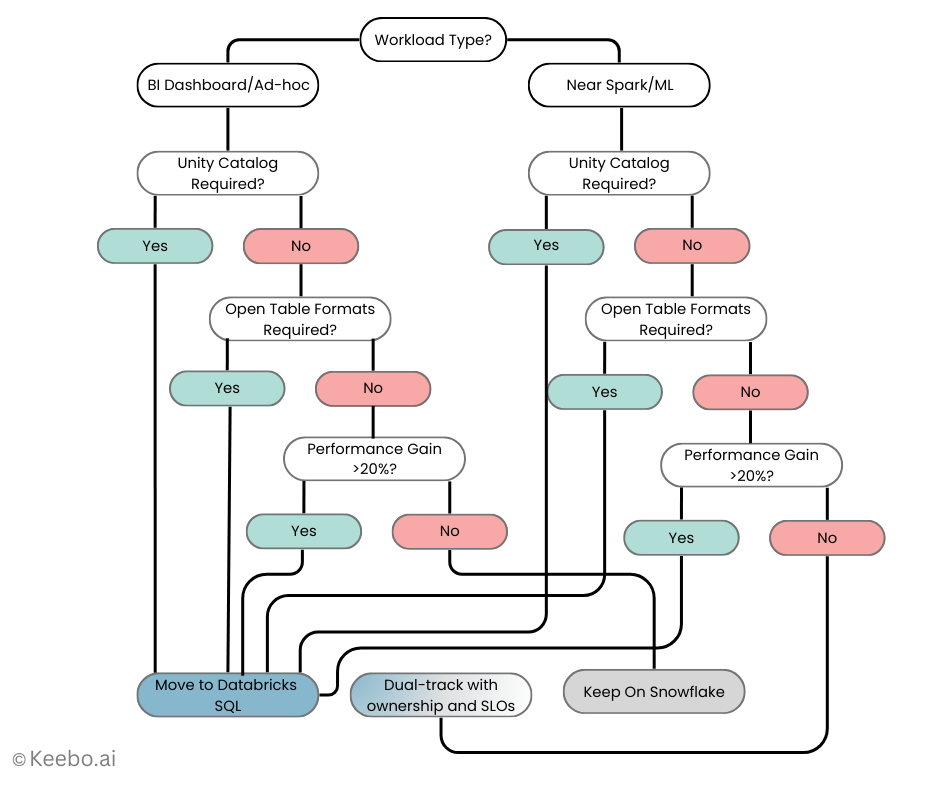
15.1 Decision Framework
Use these criteria to guide your platform selection for each workload:
- Workload shape.
- Mostly BI dashboards + ad‑hoc analytics? Run the two‑workload bake‑off from §7. If Databricks SQL shows a measurable price/performance edge for a specific dashboard or ad‑hoc pattern, shortlist it for that workload only; otherwise, keep the status quo.
- SQL near Spark/ML or streaming? Databricks SQL often fits better when SQL lives close to lakehouse pipelines, streaming tables, or ML feature work. Pilot here first.
- Mostly BI dashboards + ad‑hoc analytics? Run the two‑workload bake‑off from §7. If Databricks SQL shows a measurable price/performance edge for a specific dashboard or ad‑hoc pattern, shortlist it for that workload only; otherwise, keep the status quo.
- Governance posture.
- Unity Catalog alignment valuable across ML + SQL? That tilts toward Databricks SQL for BI endpoints that must inherit UC policies by default.
- Existing Snowflake RBAC, masking, and Marketplace policies deeply embedded? Favor Snowflake unless a workload‑level test proves clear upside.
- Unity Catalog alignment valuable across ML + SQL? That tilts toward Databricks SQL for BI endpoints that must inherit UC policies by default.
- Data‑sharing and table‑format strategy.
- Open formats/interoperability primary? Delta/UniForm and Delta Sharing may make Databricks SQL additive.
- Marketplace distribution primary? Snowflake’s Marketplace may keep certain workloads rooted where the ecosystem is strongest.
- Open formats/interoperability primary? Delta/UniForm and Delta Sharing may make Databricks SQL additive.
- Operational reality.
- Team capacity for another warehouse surface? If ops overhead is a constraint, require Serverless‑grade elasticity, fast setup, and clear SLOs, or defer.
- Team capacity for another warehouse surface? If ops overhead is a constraint, require Serverless‑grade elasticity, fast setup, and clear SLOs, or defer.
15.2 Workload Scoring Guide
Use this scoring framework to evaluate each platform objectively:
Score each platform 1–5 on the criteria below, then weight and sum. Use this to decide per workload rather than “all or nothing.”
| Criterion | Weight | Snowflake | Databricks SQL |
| Price/performance at target concurrency (p95, cold/warm) | 0.40 | ||
| Governance fit (policies, lineage, tags) | 0.20 | ||
| BI connector experience (DirectQuery/Live stability, modeling) | 0.15 | ||
| Operational overhead (setup, scaling, monitoring) | 0.15 | ||
| Sharing & table‑format strategy (Marketplace vs. open formats) | 0.10 |
Thresholds: adopt on the platform that wins by ≥ 0.3 weighted points and meets your non‑functional guardrails (security, SLOs, and cost ceilings). Otherwise, keep the workload where it is.
15.3 Implementation Sprint
Follow this sprint plan to complete your evaluation:
- Day 0–2: Run the readiness checklist from §9 (identity, governance, connectors, semantics).
- Day 3–8: Execute the two‑workload bake‑off from §7 (one busy dashboard + one ad‑hoc pattern). Capture cold/warm p50/p95, cache hit‑rates, and throughput at target concurrency.
- Day 9–10: Convert performance into fully loaded cost using §8.
- Day 11–12: Write a 1‑page readout per workload: metrics, cost, non‑functional notes, and a go/keep/dual‑track decision.
- Day 13–14: Socialize with Finance, Security, and BI leadership; lock the decision and (if applicable) the rollout owner and SLOs.
15.4 Proven Adoption Patterns
Based on successful implementations, these approaches deliver the best results:
- Targeted adoption: Move specific SQL workloads that show a clear advantage (e.g., a streaming‑adjacent dashboard or an analytics mart near Spark pipelines). Leave the rest.
- Dual‑track with ownership: If both platforms serve BI, assign explicit ownership per domain, align governance tags, and avoid duplicating the same dashboard on two engines.
- Re‑test cadence: Re‑run the two‑workload harness after major engine or pricing changes; keep the dataset and scripts so re‑tests take hours, not weeks.
15.5 Executive Summary Template
Decision: For [workload name], Databricks SQL/Snowflake wins by [Δ weighted score], delivering [X%] better p95 at [Y] concurrency and [$/report or $/1k queries] lower fully loaded cost (cold/warm). Governance and connector checks passed with [notes]. Owner: [team]. SLOs: p95 ≤ [N] sec at [M] concurrency; cost ceiling [$Z/day]. Next review: [date or trigger].
Use this framework to keep the conversation grounded: workload by workload, numbers first, and with clear owners. That’s how Snowflake‑first teams decide where Databricks SQL belongs, without getting dragged into platform ideology.
You’re absolutely right – having both “Closing” and “Conclusion” is redundant. Let me create an enhanced, unified conclusion that incorporates the 90-day action plan, maturity model, and future roadmap considerations:
16. Conclusion: Your Path Forward
The story in 2025 isn’t “switch platforms.” It’s that Databricks SQL has matured into a credible warehouse surface that many Snowflake-first teams are rightly evaluating for specific SQL workloads. The rational move is to treat this as a workload-by-workload decision: normalize governance and connectors, run a short bake-off, price the fully loaded cost (cold and warm), and adopt only where the numbers show a durable edge.
16.1 90-Day Action Plan
Transform your evaluation into actionable results with this phased approach:
Days 1-30: Assessment and Foundation
- [ ] Complete readiness checklist (Section 12) for current environment
- [ ] Identify top 5 candidate workloads for evaluation
- [ ] Set up test environments on both platforms
- [ ] Establish baseline metrics for current costs and performance
- [ ] Engage stakeholders and define success criteria
- [ ] Consider Keebo trial for optimization baseline
Days 31-60: Pilot and Evaluation
- [ ] Run 2-week bake-off for first workload (Section 5)
- [ ] Document SQL conversion requirements (Section 4)
- [ ] Calculate fully loaded costs for both platforms (Section 10)
- [ ] Test BI tool compatibility and user experience
- [ ] Gather feedback from pilot users
- [ ] Refine evaluation methodology based on learnings
Days 61-90: Decision and Implementation
- [ ] Present findings to leadership with clear recommendations
- [ ] Create migration plan for approved workloads
- [ ] Implement cost optimization strategies (Section 11)
- [ ] Set up monitoring and anomaly detection
- [ ] Document governance and operational procedures
- [ ] Plan for ongoing optimization and review cycles
16.2 Databricks SQL Adoption Maturity Model
Understand where you are and where you’re headed:
Level 1: Exploration (Months 1-3)
- Running proof-of-concepts
- Learning platform differences
- Testing with non-critical workloads
- Manual performance tuning
Level 2: Selective Adoption (Months 3-6)
- Production workloads on Databricks SQL
- Established governance practices
- Basic cost optimization implemented
- Clear workload placement criteria
Level 3: Optimized Coexistence (Months 6-12)
- Automated workload placement decisions
- Advanced optimization techniques active
- Unified monitoring across platforms
- Cost optimization tools deployed
Level 4: Strategic Integration (12+ Months)
- Platform selection fully automated
- Predictive optimization in place
- Seamless cross-platform operations
- Maximum value from both platforms
16.3 Maturity Model Visualization
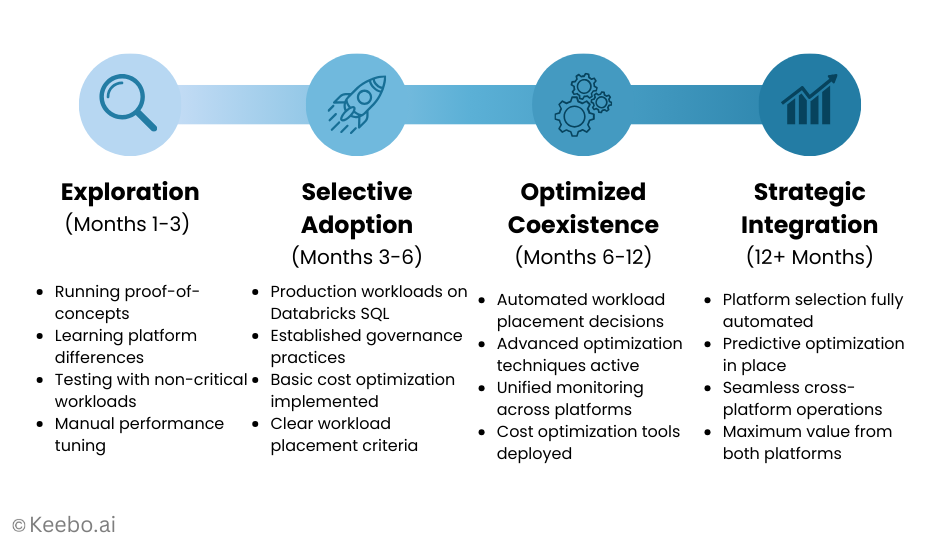
16.4 Future Roadmap Considerations
As you plan beyond the initial evaluation, monitor these evolving factors:
Technology Evolution
- Databricks: Watch for Serverless SQL enhancements, broader region availability, and deeper Unity Catalog integration
- Snowflake: Monitor Native Apps ecosystem, Iceberg improvements, and new optimization features
- Industry: Keep tabs on open table format convergence and cross-platform standards
Cost Management Evolution
- Increasing sophistication of automated optimization tools
- Better cross-platform cost attribution
- Predictive spending models
- Real-time optimization capabilities
Organizational Readiness
- Skills development for multi-platform operations
- Governance framework maturity
- Automation adoption curve
- Cultural shift from “either/or” to “best tool for the job”
16.5 Key Principles for Success
As you navigate this evaluation and beyond, remember these core principles:
- Coexistence is a feature, not a failure. With meaningful account overlap in the market, it’s normal to run both engines, each where it fits. Document ownership and SLOs so the dual-track doesn’t sprawl.
- Numbers beat narratives. Vendor momentum and published benchmarks are helpful context, but the call should hinge on your p95s, concurrency behavior, cache sensitivity, and $/report (or $/1,000 queries) for representative workloads.
- Governance defaults matter. Unity Catalog–by-default on SQL Warehouses vs. Snowflake’s native RBAC/policies will shape day-one experience for BI users. Align policies before you compare engines so you’re not measuring security semantics instead of performance.
- Automation accelerates value. Whether through platform features or tools like Keebo, automated optimization delivers better results than manual tuning while freeing your team for strategic work.
Final Thoughts
The bottom line: Databricks SQL’s maturation represents an opportunity, not a threat. Smart teams will evaluate it objectively, adopt it selectively, and maintain clear ownership boundaries. Your existing Snowflake investment remains valuable while strategic use of Databricks SQL can enhance specific workloads.
Focus on measurable outcomes rather than platform politics. Start with the 90-day plan, progress through the maturity model, and keep an eye on future developments. Most importantly, build a practice of continuous evaluation and optimization, because in the rapidly evolving world of cloud data platforms, today’s best choice might not be tomorrow’s.
If you keep the evaluation lightweight and repeatable, you’ll avoid ideology, minimize churn, and place Databricks SQL exactly where it adds the most value next to Snowflake, no more, no less. And with the right combination of strategic thinking, systematic evaluation, and automated optimization, you’ll be well-positioned to extract maximum value from both platforms well into 2025 and beyond.
Appendix A: SQL Conversion Cheat Sheet
A.1 Quick Reference for Common SQL Conversions
| Function Type | Snowflake | Databricks SQL |
| Date/Time Functions | ||
| Add days | DATEADD(day, 7, date_col) | DATE_ADD(date_col, 7) |
| Date difference | DATEDIFF(day, start_date, end_date) | DATEDIFF(end_date, start_date) |
| Extract part | DATE_PART(year, date_col) | YEAR(date_col) |
| Current timestamp | CURRENT_TIMESTAMP() | CURRENT_TIMESTAMP() |
| String Functions | ||
| Concatenate | CONCAT(str1, str2) or || | CONCAT(str1, str2) |
| List aggregation | LISTAGG(col, ‘,’) WITHIN GROUP (ORDER BY x) | STRING_AGG(col, ‘,’ ORDER BY x) |
| Split string | SPLIT_PART(str, delim, n) | SPLIT(str, delim)[n-1] |
| String position | POSITION(substr IN str) | INSTR(str, substr) |
| Type Casting | ||
| Cast syntax | col::datatype | CAST(col AS datatype) |
| Try cast | TRY_CAST(col AS type) | TRY_CAST(col AS type) |
| Window Functions | ||
| Qualify clause | QUALIFY ROW_NUMBER() OVER(…) = 1 | Use subquery with WHERE rn = 1 |
| Semi-Structured Data | ||
| JSON access | data:field::string | data.field |
| Array access | array[0] | array[0] |
| Flatten | FLATTEN(array_col) | EXPLODE(array_col) |
| NULL Handling | ||
| Null if | NULLIF(expr1, expr2) | NULLIF(expr1, expr2) |
| Coalesce | COALESCE(col1, col2) | COALESCE(col1, col2) |
| If null | IFNULL(col, default) | COALESCE(col, default) |
A.2 Key Behavioral Differences
- Case Sensitivity: Snowflake is case-insensitive by default; Databricks is case-sensitive (for string data; SQL keywords are case-insensitive).
- Division by Zero: Snowflake returns NULL; Databricks throws error
- Timestamp Precision: Snowflake supports nanoseconds; Databricks supports microseconds
- Array Indexing: Both use 0-based indexing
- String Comparison: Use LOWER() in Databricks for case-insensitive comparisons
Appendix B: Configuration Templates
B.1 Databricks SQL Warehouse Configuration
Serverless SQL Warehouse (Recommended for BI)
{

"name": "bi_serverless_warehouse",

  "cluster_size": "Small",

  "enable_serverless_compute": true,

  "auto_stop_mins": 10,

  "warehouse_type": "SERVERLESS",

  "tags": {

    "purpose": "interactive_bi",

    "cost_center": "analytics",

    "managed_by": "keebo"

  }

}
Pro SQL Warehouse (For Steady Workloads)
{

"name": "etl_pro_warehouse",

  "cluster_size": "Medium",

  "min_num_clusters": 1,

  "max_num_clusters": 3,

  "auto_stop_mins": 30,

  "warehouse_type": "PRO",

  "enable_photon": true,

  "tags": {

    "purpose": "etl_processing",

    "cost_center": "data_engineering"

  }

}
B.2 Snowflake Warehouse Configuration
BI Warehouse with Auto-Scaling
CREATE WAREHOUSE bi_warehouse WITH

WAREHOUSE_SIZE = 'MEDIUM'

  MIN_CLUSTER_COUNT = 1

  MAX_CLUSTER_COUNT = 3

  SCALING_POLICY = 'ECONOMY'

  AUTO_SUSPEND = 300  -- 5 minutes

  AUTO_RESUME = TRUE

  INITIALLY_SUSPENDED = TRUE

  COMMENT = 'Interactive BI workloads - managed by Keebo';
ETL Warehouse Configuration
CREATE WAREHOUSE etl_warehouse WITH

WAREHOUSE_SIZE = 'LARGE'

  MIN_CLUSTER_COUNT = 1

  MAX_CLUSTER_COUNT = 1

  AUTO_SUSPEND = 60   -- 1 minute

  AUTO_RESUME = TRUE

  STATEMENT_QUEUED_TIMEOUT_IN_SECONDS = 3600

  STATEMENT_TIMEOUT_IN_SECONDS = 7200

  COMMENT = 'ETL processing - optimized for long-running queries';
B.3 Cost Monitoring Setup
Databricks Alert Configuration
alert_config = {

"name": "high_cost_query_alert",

    "query_id": "dashboard_query_id",

    "rearm_seconds": 3600,

    "conditions": [{

        "op": "GREATER_THAN",

        "threshold": 100,  # Dollar threshold

        "column": "query_cost"

    }],

    "notifications": [{

        "email_addresses": ["data-team@company.com"],

        "slack_webhook": "https://hooks.slack.com/..."

    }]

}
Snowflake Resource Monitor
CREATE RESOURCE MONITOR cost_monitor WITH

CREDIT_QUOTA = 1000

  FREQUENCY = DAILY

  START_TIMESTAMP = IMMEDIATELY

  TRIGGERS

    ON 75 PERCENT DO NOTIFY

    ON 90 PERCENT DO NOTIFY

    ON 100 PERCENT DO SUSPEND;

ALTER WAREHOUSE bi_warehouse SET RESOURCE_MONITOR = cost_monitor;
Author