
1. Why We Separated Warehouses “Back Then”
In the pre-cloud era, teams ran separate physical database servers primarily for hard performance isolation—so mission-critical service-level agreements (SLAs) for customer-facing traffic weren’t impacted by heavy batch or analytical jobs. A close second reason was disaster recovery (DR): keeping a standby box in another rack or room (and sometimes another site) so a localized failure wouldn’t take everything down. That model made sense when compute was fixed, concurrency was limited, and “separate machine = separate blast radius.”
2. Why We Separate Today (Billing/Attribution & Governance)
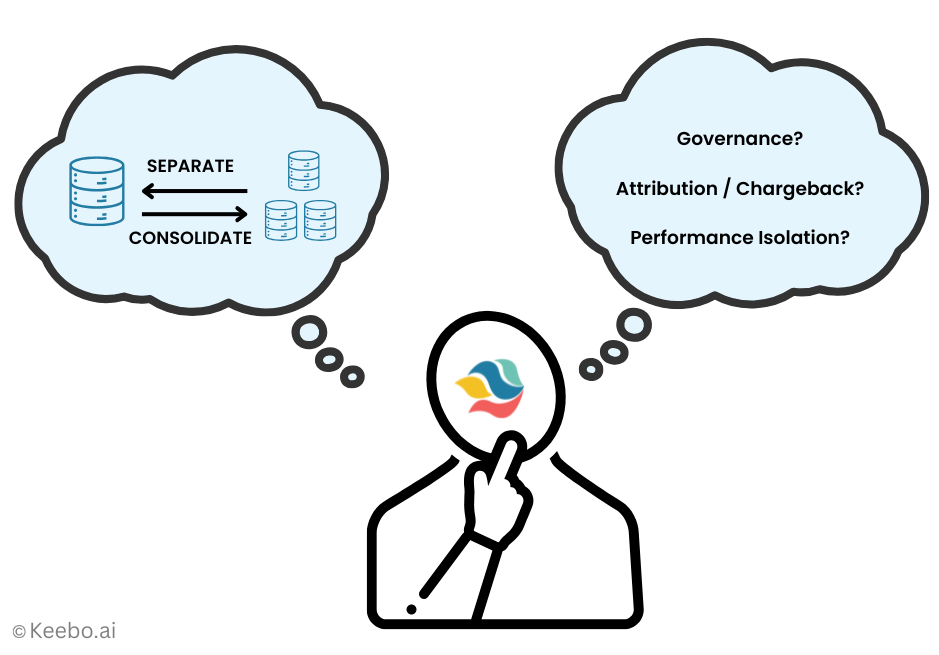
In modern cloud data warehousing, a virtual warehouse is effectively today’s “server.” Isolation still matters, but day-to-day the most common drivers for spinning up multiple warehouses are clean cost attribution (straightforward showback/chargeback of spend by extract-transform-load (ETL), business intelligence (BI), ad-hoc analytics, data science, or applications) and governance/ownership (giving each team or business unit clear control over its own policies and guardrails). A practical bonus is ease of provisioning: many teams find it simpler to size a dedicated Looker/BI warehouse differently from an ingestion/ETL warehouse than to pick one “right” size for a single shared warehouse that runs both. As the platform has improved concurrency and elasticity, the trade-off has shifted—which is why in the rest of this post I will focus on achieving attribution, governance, and performance goals without overdoing separation. Why? Because separation is not free! It has some downsides, explained next.
3. Downsides of Over-Separation
Running many non-shared virtual warehouses chips away at both cost and control. First, it reduces statistical multiplexing: when peaks for different workloads don’t overlap (e.g., morning business intelligence (BI) spikes versus late-day extract-transform-load (ETL) windows), each warehouse sits warm and under-utilized for much of the day, so you pay for capacity-hours you don’t actually need. Second, it increases complexity and governance overhead—more objects to name, permission, monitor, tag, and audit; more cold-start tuning and policy drift; more fragmented budgets and alerts. These effects are not just theoretical; the utilization gap and consolidation benefits have been explored extensively in the systems literature (see the SIGMOD 2011 study by my former colleagues on production database fleets and Alibaba’s 2022 paper on safe colocation under diurnal patterns), but those lessons aren’t yet common practice across data teams. In fact, this added complexity itself can exacerbate the cost and efficiency problem. It will become more likely for teams to mis-provision and end up with rate mismatch, e.g., small, short queries that could run on X-Small (XS) landing on Medium/Large (M/L) warehouses and billed at M/L rates for their entire runtime.
4. Clear Chargeback Without Warehouse Sprawl
You can keep Finance’s showback/chargeback precise before you touch topology. Two complementary approaches cover almost every organization and team size.
4.1. Approach 1: Native Snowflake (Query Tags + Query-Text Patterns).
Stamp each session with a QUERY_TAG (simple key–value metadata), then roll up per-query credits by tag, user, team, or app. When tags are missing, derive a workload label from query text so nothing falls through.
Set tags once per connection/session:

Roll up total cost by “workload” (tag first, else query-text signature):
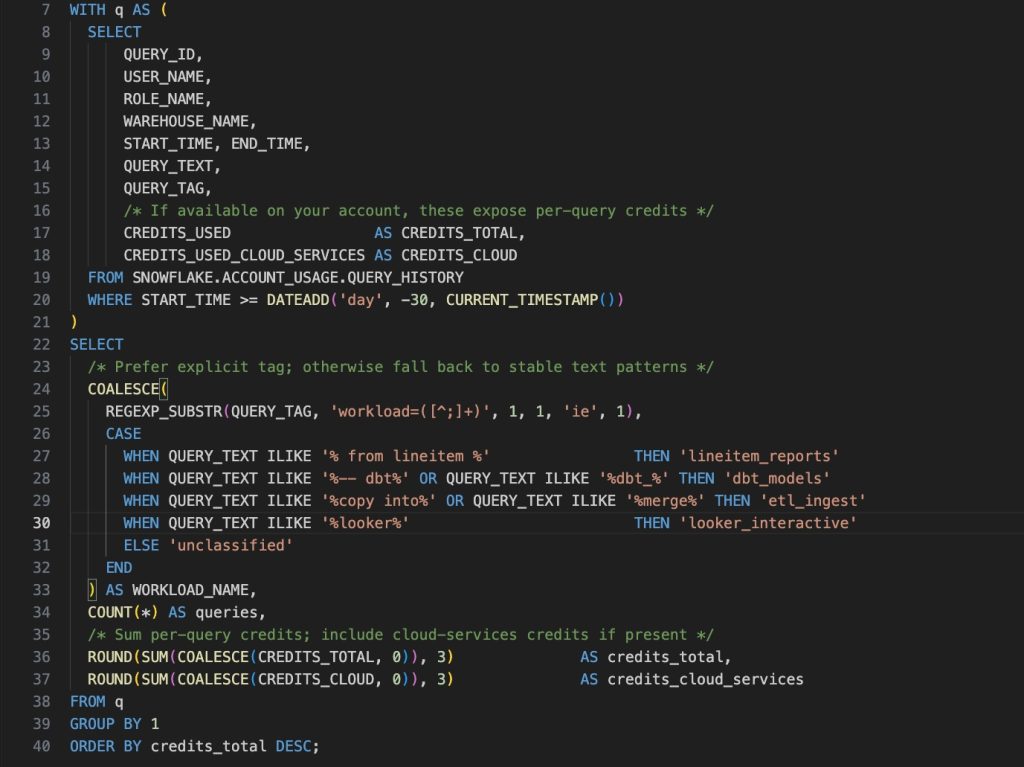
If your account doesn’t expose per-query credits in QUERY_HISTORY, you can approximate by allocating each warehouse’s metered credits across the queries that overlapped in time (weighted by runtime). Keep that logic out of the main article and run it in a scheduled job as needed.
4.2. Approach 2. Workload Intelligence (No Code Definitions).
You can use FinOps tools like Keebo’s Workload Intelligence to define workloads as named groupings based on any combination of users, roles, query tags, and recognizable query-text patterns (e.g., dashboard templates or table sets). Each workload gets an owner, a monthly budget, and a service-level objective (SLO) (for example, “p95 latency < 3s during business hours”). Costs and performance roll up to the workload regardless of which warehouse actually ran the query, so you can consolidate for utilization while keeping accountability and governance crystal-clear.
5. Governance—When Separate Is Still the Right Call
There are situations where separation is appropriate, even if you plan to consolidate elsewhere. If different business units (BUs) need independent policy, approvals, and audit trails, giving each BU its own virtual warehouse simplifies ownership and reduces cross-team friction. Separation can also help when a workload must keep distinct role-based access control (RBAC) policies or when regulations require object-level boundaries for logs and attestations. In these cases, let the BU (or workload owner) set its own resource monitors, spend thresholds, and change-control process, and hold them accountable for their service-level objective (SLO) (for example, a p95 latency target during business hours).
That said, governance doesn’t have to mean a warehouse for every team. Account-level controls—centralized RBAC groups, global resource monitors, and a standard approval workflow—still apply if you run shared pools for most workloads. A pragmatic pattern is to mix the two: keep a small number of dedicated warehouses only where autonomy or compliance demands it, and place everything else on shared pools with clear workload definitions (based on users, roles, query tags, or query text) so budgets and SLOs remain workload-centric rather than object-centric. This preserves control where it matters, without paying the ongoing complexity and idle-capacity costs of over-separation.
6. Performance Isolation Without Proliferation (Smart Runtime Placement)
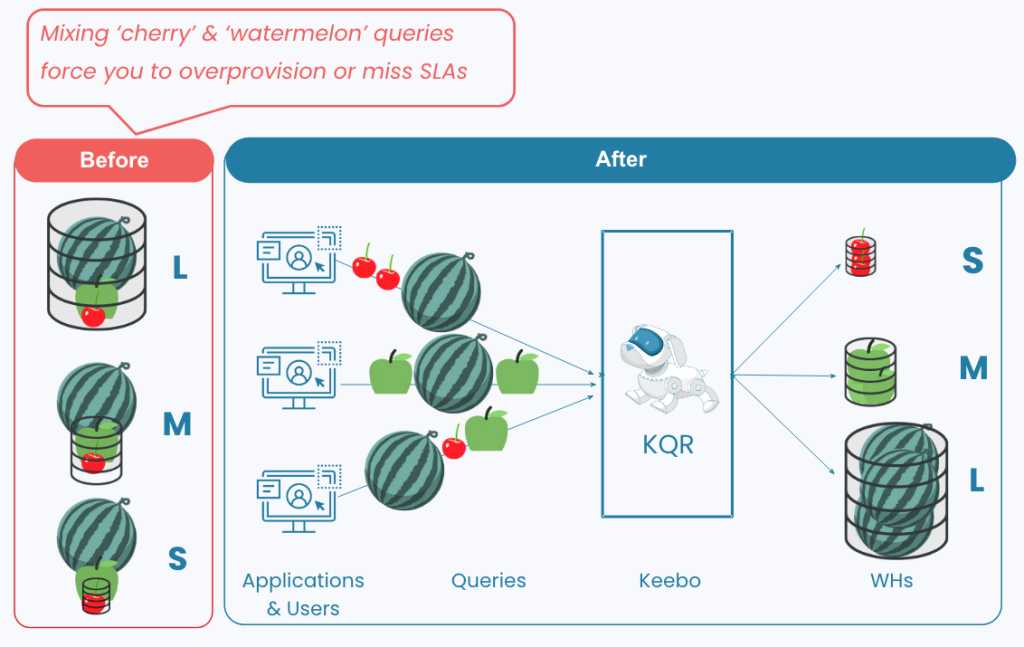
You don’t need a new virtual warehouse every time a workload needs different performance/cost behavior. With smart query routing (adaptive query placement at execution time), you keep small/short queries on warm Small/Medium (S/M) capacity, send genuinely heavy scans to Large (L/XL) only when they actually appear, and steer priority templates or roles to reserved capacity—meeting service-level objectives (SLOs) without multiplying warehouses. To visualize why this matters, see the “cherries vs. watermelons” before/after diagram below.
Concrete Examples of Routing Rules:
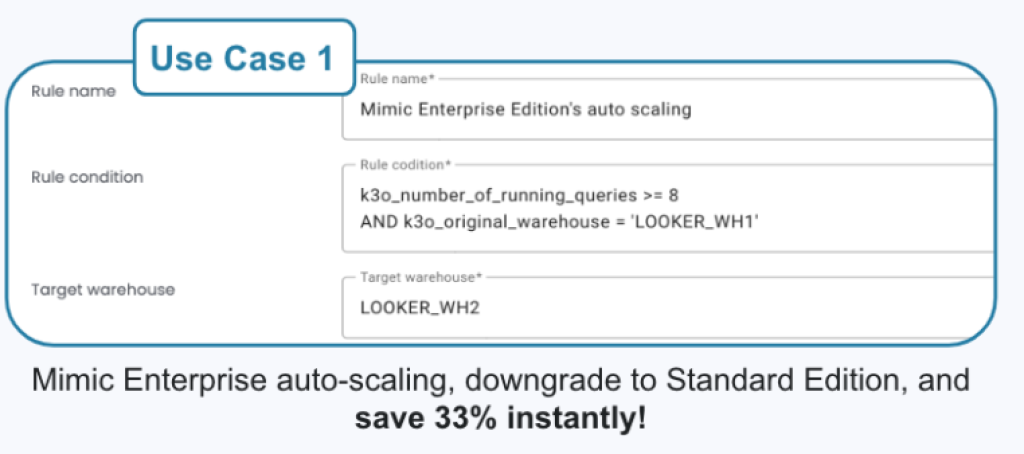
Example 1: Handle BI bursts without paying for Enterprise auto-scaling: if concurrent queries on your main BI warehouse spike, route overflow—see the BI burst policy example below, e.g., “if running queries ≥ 8 on LOOKER_WH1, send overflow to LOOKER_WH2”:
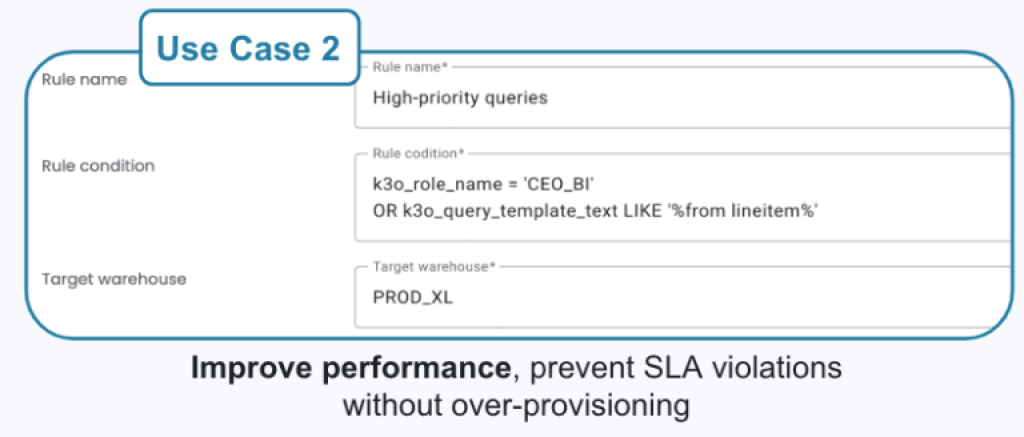
Example 2: Guarantee executive dashboards without blanket oversizing: pin high-priority roles/templates to reserved capacity—see the priority routing example below (e.g., role CEO_BI or a known query template).
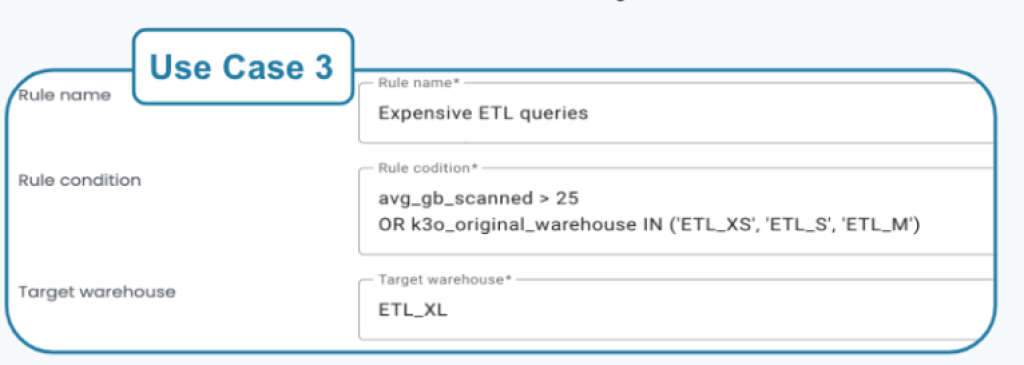
Example 3: Promote heavy ETL only when thresholds are breached: send large scans to bigger capacity when they actually cross a bar—see the “expensive ETL” example below (e.g., avg_gb_scanned > 25).
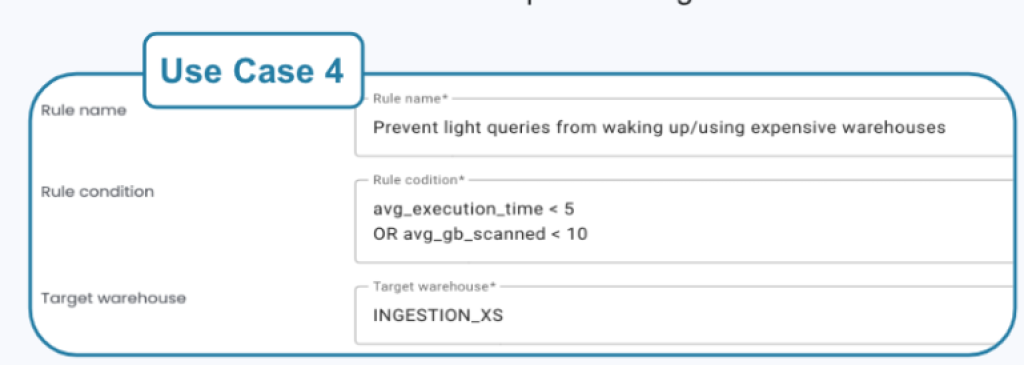
Example 4: Stop “cherries” from waking expensive pools: divert tiny queries to a small warehouse—see the “keep small queries off large boxes” example below (e.g., avg_execution_time < 5s or avg_gb_scanned < 10).
These policies live in one place (approve, edit, and roll back), so you preserve governance while keeping your object count low and utilization high. For additional background on why burst-on-appearance beats permanent oversizing, see our Smart Query Routing page.
7. Quick Decision Table — Separation vs. Consolidation
Here’s my suggested checklist. Read across each row and mark the column that best fits your situation. If three or more checks land in one column, choose that direction for now (and leverage some of the ideas/tools I discussed earlier in this post to close the gap).
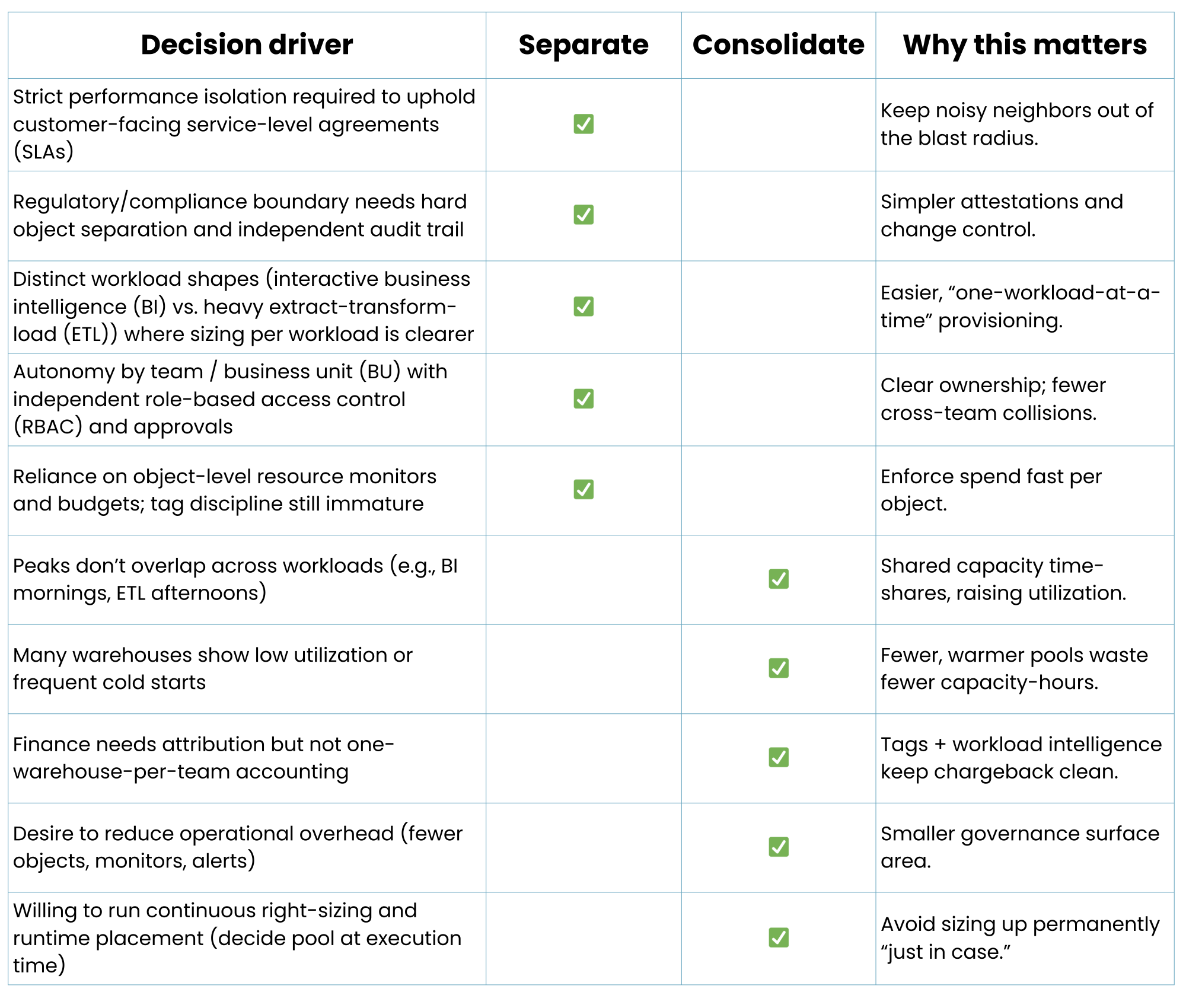
Our suggested rule of thumb: if ≥ 3 checks fall in Separate, keep it separate; if ≥ 3 land in Consolidate, collapse your warehouses into a few shared pools (e.g., Interactive BI, Critical App, Batch ETL) where each pool has a variety of different warehouse sizes and then rely on query tags + workload intelligence for attribution and smart query routing to protect SLAs.
8. Wrap-Up: Use Separation Where It Matters—Consolidate Everywhere Else
If you remember one thing from this post, make it this: separate when you truly need hard performance isolation, regulatory boundaries, or business-unit (BU) autonomy; consolidate when the real goals are billing/attribution, governance at scale, and higher utilization. You can keep Finance happy and protect service-level objectives (SLOs) without multiplying virtual warehouses: start with query tags for native attribution, add workload intelligence (combine users, roles, tags, and query-text patterns) so every query rolls up cleanly, and rely on smart runtime placement so small queries reuse warm Small/Medium (S/M) capacity while heavy work only touches Large (L/XL) when it actually appears.
Try it on your data: you can explore Workload Intelligence for free to see exactly where consolidation would save money, or pilot smart query routing to improve cost and performance without creating more warehouses—just schedule a 30-min demo or free trial.
FAQ
What does warehouse separation mean in Snowflake?
Warehouse separation refers to using multiple virtual warehouses for different workloads, business units, or teams to isolate performance, costs, or governance boundaries.
Why did teams historically separate data warehouses?
In on-prem systems, separation ensured physical isolation and disaster recovery. Each server handled its own workload to prevent SLA breaches.
Why do teams still separate warehouses today?
Modern separation is mainly for cost attribution, ownership, and governance – not performance – making it easier to track budgets and responsibilities.
What are the downsides of running too many warehouses?
Over-separation reduces utilization, increases Snowflake credit consumption, and adds administrative overhead for monitoring, naming, and policy management.
How can I track cost attribution without creating multiple warehouses?
Use Snowflake’s QUERY_TAG or tools like Keebo Workload Intelligence to roll up spend by workload, user, or role automatically.
When does separation still make sense?
When different business units require independent audit trails, RBAC policies, or compliance isolation for regulatory reasons.
What is statistical multiplexing and why does it matter?
It’s the efficiency gained when workloads share compute capacity. Separate warehouses lose this effect, wasting idle compute hours.
How can I get performance isolation without proliferation?
Use smart query routing or runtime placement to dynamically match workloads to capacity sizes, maintaining SLAs without extra warehouses.
How does governance fit into consolidation strategies?
Centralized governance (RBAC, monitors, approval workflows) allows shared warehouses while keeping clear accountability via workload definitions.
What’s the rule of thumb for separation vs. consolidation?
Separate for compliance or autonomy; consolidate for efficiency, cost control, and easier management.
Author