Using AI to Save Money on Snowflake: A Practical Guide for the Data Team

In mid-2023, Snowflake found itself in the middle of some controversy about Instacart, one of its biggest customers. While the situation was interesting for pundits and those with particular interest in the Snowflake-Databricks rivalry, that’s not what caught our eye here at Keebo. The discussion on reducing Snowflake costs drove our interest.
Keebo is the only fully-automated Snowflake warehouse optimizer. Customers rely on Keebo to extend Snowflake credits amid growing data demands. So when Snowflake suddenly started showing great interest in helping their customers save money, we were intrigued.
Snowflake’s focus on optimization may have brought you here. If others save 50%, why shouldn’t you?
Snowflake’s optimization advice is difficult to follow and lacks automation. This article covers:
- Snowflake’s advice for reducing costs
- Problems with Snowflake’s optimization methodology
- Using AI to automate Snowflake savings
- How Keebo’s AI works
Part 1: Snowflake’s Advice for Reducing Costs
Snowflake offers data clouds on a consumption model. This model provides flexibility, speed, and scalability. It is easier than ever to spin up warehouses and applications. Many teams adopt Snowflake for this reason. Consumption models increase costs as usage grows. Optimize costs by running Snowflake efficiently.
Snowflake outlines their advice in a presentation from Snowflake Summit 2023 which is now available for anyone to watch upon registration. We can examine this advice by organizing it into 3 areas:
- Snowflake optimization capabilities
- The most important way to reduce costs
- Snowflake’s 3-step process for optimization
Snowflake Cost-saving Capabilities
Snowflake provides three general areas for reducing costs. Let’s look at each and some of
the practical steps you can take:

The most important way to reduce Snowflake costs
Focus on the primary optimization target. The priority is clear: optimize warehouse size. Here is a quick overview.
How Snowflake data warehouse sizes work
Warehouse size refers to compute power, not storage. The larger the warehouse, the faster it can handle a compute task (query). Larger workloads require larger warehouses. Size warehouses to meet query SLAs. Snowflake currently offers the following “T-shirt” sizes:

How Snowflake data warehouse sizes work
Your cost doubles with each increase in warehouse size. This is why cost strategies prioritize warehouse size. Choose a warehouse size that handles most queries and meets SLA requirements. Sizing for peak queries leads to underutilized and costly warehouses. Undersized warehouses cause queries to spill to slower storage. Spillage leads to slow or failed queries and frustrated users.
Choosing the Right Size Is Not Static
Increasing size speeds queries but also increases cost. In practice, sizing requires trade-offs. For more information on this, see part 3 of our series on Snowflake Optimization.
Choosing the right size is difficult, so teams follow repeatable processes. Warehouse sizing is not a one-time decision. Workloads change, so sizing must adapt.
A 3-step process for Snowflake optimization
If you were to watch all the presentations on optimization done by Snowflake customers, you
would find some common themes which we can summarize into a 3-step process.
Step 1: Write good queries
If your queries are not optimized to begin with, there is little you can do to optimize Snowflake and save money. Optimized queries require less compute and reduce costs. So with an eye on optimizing warehouse size, we can categorize the query optimization advice like this:
- Process as little data as possible. The fewer columns you choose, the better for performance and thus for cost.
- Avoid common SQL mistakes. SQL can produce the same result in many ways. Some approaches increase processing time and cost. We list common SQL mistakes separately.
- Be careful with clustering. Snowflake stores your data in micro-partitions. The more partitions you need to scan for your query, the slower and thus costlier the query becomes. By default, Snowflake stores your data in the order it was ingested. This results in a sort of “natural cluster” where all your recent data is grouped together by time. This works well as most queries are narrowing down the data (pruning) by a time period. So you should be hesitant to change this unless you have special circumstances, such as querying by event from streaming data
Some teams also benefit from materialized views.
Step 2: Monitor key performance parameters
You must measure performance to manage it. The customers that presented at Snowflake Summit in 2023 certainly took this to heart. Teams create dashboards in Snowsight to track performance. You could also use Snowflake’s Query Profile that is available in the classic console. Key metrics include:
| Bytes scanned | In general, the higher the bytes scanned to answer a query, the larger the warehouse needed. If most queries scan under 1GB, use small or extra small warehouses. |
| Execution time | High values indicate expensive queries. Optimize queries or scale to a larger warehouse. |
| Query load percent | If below 50%, move queries or increase size. |
| Bytes spilled to local and bytes spilled to remote | This indicates undersizing. Bytes that can’t fit into memory “spill” to disk storage. Spilling slows queries significantly. |
| Queued time | High values indicate resource contention. Increase size or move queries. |
There are many other parameters you can measure, and many customers look at big picture items too, such as credits used (spend) per warehouse and account. Snowflake Budgets is a great way to get started on this.
Step 3: Make warehouse size optimizations
Once you start tracking performance metrics, you have the data you need to begin making adjustments. Since warehouse size was always brought up as the most important optimization factor, let’s look at that as our example here.
One of the key parameters to track is bytes scanned. You can then translate that to recommendations for warehouse size. The following chart has been shown in many presentations by Snowflake and their customers:

So if your bytes scanned is between 1-20GB, the recommendation is either a small, medium, large, x-large or 2x-large warehouse. Clearly, you are going to get more specific here. Unfortunately, the exact size you need can’t be determined since query workloads vary wildly. Even in Snowflake’s own documentation, the advice is to experiment until you find the ideal size: “Experiment by running the same queries against warehouses of multiple sizes (e.g. X-Large, Large, Medium). The queries you experiment with should be of a size and complexity that you know will typically complete within 5 to 10 minutes (or less).”
Any Google search on the subject of Snowflake warehouse sizing will reveal essentially the same advice. But you can cut down on the guesswork by building and monitoring a report that will show you key metrics like those mentioned above.
Part 2: Problems with Snowflake’s Optimization Methodology
Snowflake’s recommended optimization method isn’t unique to them. Many enterprises, whether they use Snowflake or not, follow a similar methodology for optimizing the query workload across the entire company to reduce the cost of their shared infrastructure. In the IT world, there has always been a reactionary tendency to try and clean up the mess one query at a time and it seems the move to cloud data warehouses hasn’t changed this common attitude at all, and indeed Snowflake’s own advice starts with tracking queries. This approach creates four key problems.
Ignoring the long tail
Snowflake focuses on expensive queries. This reveals an important insight: even big organizations with massive data teams will find it prohibitive to look at all their queries. Teams focus only on a small set of expensive queries. For example, if you can only afford manually inspecting 1,000 queries, then you obviously want to focus on your 1,000 slowest and most frequent queries. This ignores smaller queries that still drive costs.
Why This Approach Misses Real Savings
The 80-20 rule does not apply to query workloads: there is often a long-tailed distribution of smaller, faster queries that because of their large numbers still count for a large portion of your overall bill. Optimizing all queries would unlock significantly more savings.
Relying on manual effort
Even identified queries require manual optimization. Data teams rely on users to fix inefficient queries. Teams distribute optimization work across users. This may seem fair. After all, these analysts are using a shared resource that is on a pay-as-you-go model, so they need to use it responsibly.
This raises efficiency concerns:
- Depends on expertise. Not everyone who needs to use the database needs to be a database expert. Is it wise to ask a supply chain guru or a marketing operations expert to spend their time writing perfect queries, or optimize the queries they wrote months ago? Weren’t these individuals recruited for a different skill set to perform a different business function for their company?
- Hides manual effort. More importantly, distributing the manual work to almost everyone who is writing queries will certainly lessen the burden on any single individual and allows the company to “manually” optimize more queries, but it doesn’t make it any less manual. You are still spending a lot of time on hand-tuning SQL queries, one query and one person at a time. That’s a lot of money, even indirectly. In some ways this is even worse because now you cannot even track how much of the organization’s resources are spent on this manual work. It’s all hidden and distributed.
In some ways, the company is still paying the same tax for the manual optimizations, but more people are being taxed and some of them are paying an even higher tax rate because they are not trained, hired, or motivated for this line of work.
Not specific enough
A lot of optimization methodology depends on two tasks:
- Finding the expensive and frequently-run queries that need to be examined by people.
- Examining the query plan (the query profile in the case of Snowflake) for optimization inspiration.
But all this can do is reveal an expensive query and the expensive operator in that query. The team must examine it long enough to see what can be done to speed it up. But we all know how intimidating real-life queries can look. In many cases you cannot even see your entire query on the screen without having to scroll through multiple pages. Likewise, what if the query profile is simply showing you are scanning several terabytes of data? How do you expect your end user to solve that?
We need to provide better tooling and more specific advice to our end users if we’re expecting them to “solve” cost and performance problems. Even still, in many cases it’s not even possible to optimize your workload one query at a time. Instead, you should identify the common blocks of computation across many queries and find a way to reuse that computation (one of the things Keebo’s query acceleration product does).
Dependent on trial and error
One of the most common ways of optimizing Snowflake (or cloud warehouses in general) is rightsizing your warehouses (see this article for more on this). The problem, as we described earlier in this document, is that even Snowflake’s official advice is to choose the optimal size for your warehouse through trial-and-error. Snowflake recommends tracking bytes scanned and adjusting size. Say your query scans less than 20GB. According to Snowflake’s own advice, as shown in the table above, the optimal warehouse size for you might be small, medium, large, x-large, or even 2x-large. But which size should you choose? You only find out through trial and error.
Teams must run significant experimentation. Even correct sizing may fail as workloads change. Optimal sizing varies by time and workload. What should teams do? Teams must repeat this process constantly.
Part 3: Using AI to Optimize Snowflake
Even if you want to try and overcome all these problems and build a team to optimize Snowflake, you still face another challenge: you’ve only optimized to the workload you have now. When your workload changes, the optimizations your team spent so much time on could become irrelevant instantly.
How Machine Learning can Optimize Snowflake
Solve this with automated optimization. Keebo continuously optimizes Snowflake warehouses. There are 3 factors you should consider when choosing a “robot” to optimize Snowflake for you:
- It must always be watching.
- It must make actual optimizations, not merely suggestions.
- It should align with your goals, and be priced based on your savings.
Here’s how Keebo meets these requirements. Recall from earlier in this document that the most important parameter to optimize is warehouse size. So let’s begin with that. Take as an example, a Snowflake warehouse during several horse of use with a default size of extra large:

Keebo uses 70+ parameters to determine optimal warehouse size. In this example, at 2 pm, Keebo determined that the warehouse could be downsized from extra large to large for 60 minutes. Keebo applies the change automatically.
Continuous Optimization in Practice
At 3 pm, an increasing volume of queries (or size of queries) meant that Keebo increased the size back to extra large so users would not have a performance slowdown. Then again a downsize at 3:30 pm and so on.
In total, 12 credits were saved between 1 and 5 pm. To calculate this, we use the following formula:
Default size – downsize * (hours downsized) = savings
An extra large warehouse costs 16 credits per hour. If we plug this into our formula, we get:
16 – 8 * (1.5) = 12
A person could try to manage this manually, but not at scale. Evaluating 70+ parameters in real time is not practical. Keebo detects changes and adjusts automatically.
Your solution must monitor continuously and take action, not just recommend changes. Many tools still rely on manual intervention. That approach breaks down across multiple warehouses and 24/7 workloads.
Another key optimization is warehouse suspend. Snowflake can shut down idle warehouses, but aggressive settings can hurt performance. Here’s an example using auto-suspend:

Let’s focus on the top line first, labeled “No Keebo.” Here the default suspend parameter is 10 minutes. In other words, after a 10 minute period with no activity, Snowflake will shut down the warehouse. But what if, as is shown in the second line, Keebo can determine that the suspend interval can safely be set to 5 minutes? In this case you would save 2.66 credits from that extra time. We calculate savings using:
Warehouse cost in credits * (extra minutes of suspend time / 60) = savings
Since an extra large warehouse costs 16 credits per hour to run, we can then compute:
16 * (10 / 60) = 2.66
Small savings add up across warehouses. Customers report 20%+ savings. While possible manually, this approach doesn’t scale. Keebo continuously identifies and applies optimizations, with full visibility into every action.

Automation only matters if pricing aligns with your goals. Keebo charges a percentage of savings, not a flat fee or spend-based price—so we only succeed when you save.
Getting Started with Keebo
You can get started with Keebo quickly. Keebo is cloud-based and only accesses usage metadata. The basic steps to set up Keebo take only about 30 minutes:
- Create a Snowflake account for Keebo that has the ability to modify warehouses.
- Create a schema for Keebo that contains only the usage metadata we need to see. This means that Keebo can only see this metadata and never any user data.
- Add members of your data team to the Keebo portal so you can all track optimizations and savings.
After a few weeks, Keebo estimates your savings.
Keebo is automatic and adjusts to changing conditions in real time, so there is no need to monitor it. But this does not mean you don’t have any control. In fact, you can adjust our algorithms for complex scenarios and schedules, and Keebo is fully auditable (see this article for details). This screenshot shows the various controls you have per warehouse, including our slider bar to help balance cost savings with query performance:

Part 4: How Keebo’s AI Works
You might be wondering how this all works. After all, we are making some big promises here: fully automated optimization that requires no human involvement and is priced based on savings. Perhaps you’ve seen other “optimizers” that claim they are fully automated. In this final section, we’ll describe how our AI works–a look behind the scenes so you can see exactly why Keebo is unique.
Core Components
At the core of Keebo is data learning—our patented machine learning for warehouse optimization.
We train models on Snowflake performance telemetry (70+ fields), including query volume, timing, queuing, and bytes scanned. We never use customer or business data.
Models continuously learn from new data and past actions. If an optimization risks performance, Keebo automatically backs off.
Each warehouse gets its own model, which makes real-time decisions. These models consider three inputs:
- Cost model: predicted impact on cost and performance
- Constraints and trade-offs: customer-defined rules and slider settings
- Real-time feedback: latency changes, query patterns, and workload spikes
This allows Keebo to adapt quickly and optimize each warehouse independently.
Here is the dialog in Keebo where data engineers can set a rule constraining the actions of smart models:

Keebo continuously monitors performance metrics, such as latency and queue time, to evaluate actions and guide future decisions. Smart models detect workload changes in real time.
This process leads to action. Keebo applies decisions directly through the Snowflake API, typically as ALTER WAREHOUSE commands. For example, it can change a warehouse like SALES_WH to medium size.
ALTER WAREHOUSE SALES_WH
SET WAREHOUSE_SIZE=MEDIUM;
Every action taken by the actuator is recorded and then displayed in the Optimizations tab of Keebo so you can always keep track of what is happening:
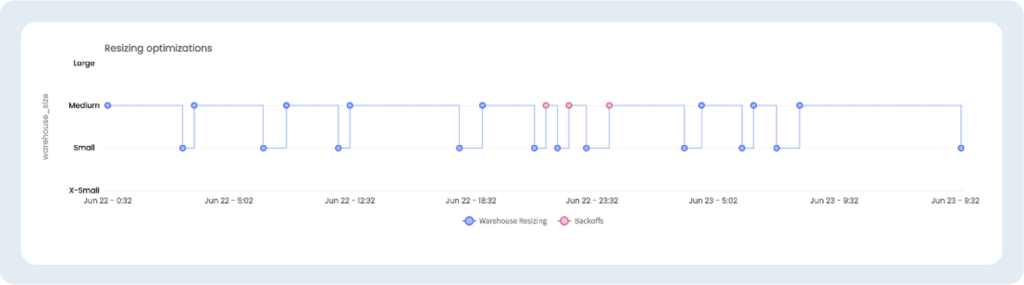
In this example, Keebo resizes from medium to small and back based on learned patterns. The red dots show backoffs, where Keebo resets size after workload spikes. This level of real-time adjustment is difficult to match manually and highlights the value of taking action, not just making recommendations.
Warehouse Cost Model
Recall the three requirements for a Snowflake optimization solution:
- It must always monitor workloads.
- It must take action, not just recommend.
- It must align with your goals and pricing.
Keebo’s smart models handle the first two. Our warehouse cost model addresses the third.
Keebo compares each warehouse’s optimized state to its original state—what we call with Keebo and without Keebo. The difference between these states defines your savings, which we use for pricing.
To estimate savings, Keebo replays your query workload and compares costs across both states. We pull with Keebo costs directly from Snowflake billing data. For without Keebo, we simulate usage by replaying queries hour by hour. This includes warehouse size, auto-suspend settings, and cluster scaling.
We also account for query timing, concurrency, and historical performance patterns. This ensures accurate cost estimates, even as workloads change.
The result is a transparent, usage-based model. You pay based on actual savings, keeping Keebo aligned with your goals.
Data Learning Algorithm
All of this is wrapped-up in our data learning algorithm, based on query and billing history (the telemetry data). You can see how all of the items described above, especially slider positions, constraints, actions, and savings estimations coming together:

There’s more detail behind our approach, but we’ll keep this high-level. Here’s how Keebo’s data learning works.
Keebo uses deep reinforcement learning to:
- Optimize for each workload
- React quickly to changing conditions
We retrain models regularly using the last 90 days of data. We combine this with our cost model and your slider settings to balance cost and performance.
For every action, Keebo evaluates whether it should act now. For example, suspending a warehouse too early can hurt performance. If you prioritize savings, Keebo can act more aggressively, even with some risk.
This is the key difference from other “optimizers.” Keebo continuously learns, evaluates trade-offs, and takes action in real time—then adjusts if needed.
The result is fully automated Snowflake optimization aligned with your goals.
Results
This all sounds innovative and interesting. But does it work? You can read the results of our own testing here, but to summarize, Keebo saves Snowflake credits for both predictable and unpredictable workloads without increasing query latency. In fact, the more unpredictable the workload, the better the savings.
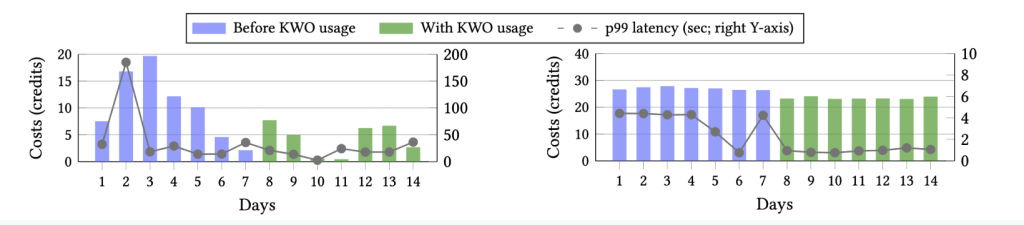
While the results above are from lab testing, we see similar and even better results with real-world customers.
The best way to evaluate Keebo is on your own workloads. Keebo offers a free, two week trial. Setup takes under an hour, with results in days. Request a demo today.