Keebo’s Complete Guide To Optimizing Snowflake’s Cost And Query Performance


Snowflake is a leading cloud-based data warehouse. It went public in 2020 with the largest software IPO. Snowflake provides a secure, scalable database engine and separates compute and storage, so customers pay only for what they use. Unlike on-premises data warehouses, Snowflake provides a flexible and fully managed SaaS analytics solution.
Snowflake’s pay-as-you-use pricing can increase costs quickly, especially in shared environments. As data and compute needs grow, costs rise significantly. Users can set alerts when usage exceeds a budget, but this does not solve long-term growth. Snowflake optimization is the only reliable way to preserve resources at scale.
Optimizing Snowflake Is A Challenge, But Crucial
Performance optimization is always difficult. It is even harder in cloud data warehouses like Snowflake. Traditional data warehouses matured over decades. Cloud warehouses prioritize ease of use over advanced tuning. Cloud data warehouses are used by diverse teams. Users have varying levels of database expertise. This increases poorly written queries, suboptimal schemas, and inefficient ingestion patterns. Easy scaling creates shortcuts for solving performance issues. This often increases compute costs.
Cost optimization is even more challenging when it comes to Snowflake. The reason is Snowflake’s pricing model. Total cost depends on usage of storage, compute, cloud services, and serverless features. You are charged credits based on warehouse size and runtime.
Nonetheless, Snowflake is one of the most popular cloud data warehouses in the world. Performance and cost optimization drive long-term success on Snowflake. It improves user experience, increases adoption, and frees resources for core priorities.
Compute costs are significantly higher than storage and services for most customers.
We present two optimization approaches: manual and automated. Use the following guidelines to choose the right approach.
Which Optimizations To Use
When To Use Manual Optimizations
Manual optimization includes ingestion, queries, schema, and warehouse changes.
Manual optimization works well for ingestion. Centralized teams manage ingestion, and it changes infrequently. Once optimized, pipelines need minimal monitoring or training.
Manual optimization works best for small workloads with few users and queries. It does not scale, requires significant time, and often produces suboptimal results.
When To Use Automated Optimizations
Manual optimization becomes time-consuming and less effective as workloads grow.
- Most optimizations require tradeoffs across competing factors. Evaluating impact across variables takes hours. Engineers rely on rules of thumb, which produce helpful but suboptimal decisions.
- Many users write queries across the organization. Central teams do not always control schema changes, making consistent optimization difficult.
- Workloads change constantly, so optimizations quickly become outdated. Performance projects become ongoing work. Weigh benefits against the cost of expensive engineering time.
- Even skilled DBAs cannot optimize every query. Improving slow queries may not reduce costs due to Snowflake’s runtime-based pricing. Savings only occur if you downsize warehouses or reduce auto-scaling frequency.
Automated optimization scales better for large workloads. It reduces errors and manual effort. Systems monitor workloads and adjust in real time to maintain performance and cost efficiency.
Manual Approach
1. Ingestion Optimization
Overall, frequent ingestion is expensive because Snowflake bills based on warehouse runtime, regardless of utilization.
2. Query Optimization
In practice, poorly written queries drive costs, but manual optimization doesn’t scale.
Reviewing even a small fraction of queries takes significant effort, and optimizing a few rarely reduces costs directly. In Snowflake, savings come from downsizing or reducing scaling—not individual query fixes.
Below are common query mistakes that impact performance and cost.
- First, avoid SELECT *. Since Snowflake is columnar, selecting fewer columns improves performance.
- Next, avoid nested queries, as optimizers struggle to optimize them effectively.
- SELECT A FROM T T1
WHERE T1.B > ANY (SELECT T2.B FROM T T2 WHERE T1.A = T2.A);
- SELECT A FROM T T1
- This can be rewritten as:
- SELECT DISTINCT A FROM T T1
JOIN T T2 ON T1.A = T2.A
WHERE T1.B > T2.B;
- SELECT DISTINCT A FROM T T1
- Additionally, use LEFT JOIN instead of IN or EXISTS when possible.
- SELECT A FROM T1
WHERE T1.B NOT IN (SELECT T2.B FROM T2 WHERE T1.B = T2.B);
- SELECT A FROM T1
- This can be rewritten as:
- SELECT A FROM T1
LEFT JOIN T2 ON T1.B = T2.B
WHERE T2.B IS NULL;
- SELECT A FROM T1
- Similarly, avoid inequality joins when possible. For example:
- SELECT T1.A, COUNT(DISTINCT T2.A)
FROM T T1 JOIN T T2 ON T1.A <= T2.A
GROUP BY T1.key, T1.A ORDER BY T1.A DESC;
- SELECT T1.A, COUNT(DISTINCT T2.A)
- Instead, use:
- SELECT A, DENSE_RANK() OVER (ORDER BY A DESC) FROM T;
- Finally, use MIN or MAX instead of RANK() for top-K queries when possible.
- SELECT MAX(A) AS secondA
FROM (
SELECT RANK() OVER (ORDER BY A DESC) AS A_rank, A FROM T
)
WHERE A_rank = 2;
- SELECT MAX(A) AS secondA
- This can be simplified to:
SELECT MAX(A) AS secondA
FROM T
WHERE A < (SELECT MAX(A) FROM T); - Avoid complex join expressions. Precompute values before joins to improve performance.
- Use UNION ALL instead of UNION unless you need deduplication.
- Use ANSI joins to improve optimizer performance.
- FROM T1, T2 WHERE T1.A = T2.B
use the following:
FROM T1 JOIN T2 on T1.A = T2.B
- FROM T1, T2 WHERE T1.A = T2.B
3. Schema Optimization
Relational databases use physical, logical, and external schemas. Good design aligns structure with business needs and improves performance.
- Views improve readability, security, and reuse. They help less-experienced users avoid inefficient queries. Complex view hierarchies create nested queries that are harder to optimize.
- However, while materialized views improve performance, they may increase costs depending on refresh frequency and usage.
- Clustering keys improve performance by enabling partition pruning. Snowflake organizes data into micro-partitions, typically by insertion order, which works well for date-based queries. You can use SYSTEM$CLUSTERING_DEPTH to measure partition overlap—lower values mean better pruning and performance.
- For example, consider auto clustering or custom keys when:
- Frequent DML after initial loads can degrade clustering by increasing partition overlap, reducing pruning efficiency. You can detect this using SYSTEM$CLUSTERING_DEPTH.
- Snowflake now handles reclustering automatically. You can monitor or disable auto clustering, but high costs often signal a poor clustering key—consider updating it instead.
- Choose clustering keys based on cardinality and query patterns. Avoid very low or very high cardinality columns. For high-cardinality fields (e.g., timestamps), use expressions like to_date() or trunc() to reduce distinct values.
- Best candidates are columns used in filters (WHERE), followed by join keys, then columns in GROUP BY, ORDER BY, or DISTINCT.
- You can use multiple columns (up to 3–4). For multi-column keys, order them from lowest to highest cardinality for best performance.
4. Warehouse Optimization
Data ingestion can be expensive under Snowflake’s billing model. To control costs, size warehouses appropriately, run them only during ingestion, and scale down after.
| WAREHOUSE SIZE | CREDITS/HOUR |
|---|---|
| X-SMALL | 1 |
| SMALL | 2 |
| MEDIUM | 4 |
| LARGE | 8 |
| X-LARGE | 16 |
| 2X-LARGE | 32 |
| 3X-LARGE | 64 |
| 4X-LARGE | 128 |
| 5X-LARGE | 256 |
| 6X-LARGE | 512 |
With Enterprise edition, multi-cluster warehouses scale out automatically by adding clusters during high demand and suspending them when no longer needed.
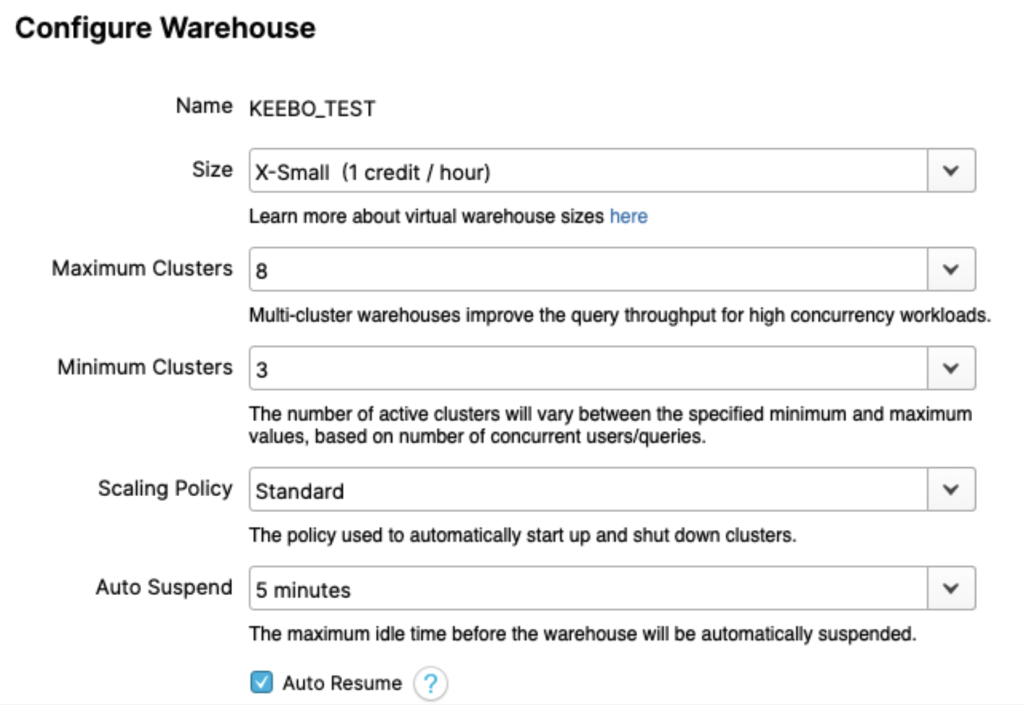
Scaling up increases size; scaling out adds clusters. While costs may match in theory, performance and efficiency differ. As a rule of thumb, scale up for slow queries and scale out for high concurrency.
Avoid relying on TOTAL_ELAPSED_TIME alone—it’s often a symptom, not the cause. Instead, check these QUERY_HISTORY fields:
- QUEUED_OVERLOAD_TIME: High values indicate queries waiting on others—scale out or separate workloads.
- COMPILATION_TIME: High values indicate complex queries.
- EXECUTION_TIME: High values signal expensive queries—optimize or scale up.
- QUEUED_PROVISIONING_TIME: Non-zero values suggest frequent suspends—adjust auto-suspend.
Separate warehouses improve isolation and control but often increase costs. For example, running two queries on one warehouse may cost 0.8 credits, while splitting them across two can raise costs to 1.2 credits unless you downsize—at the expense of latency.
Because workloads are complex, configurations are rarely optimal. Experiments help, but maintaining performance and cost efficiency requires automation.
Set auto-suspend carefully. Short intervals reduce runtime but can hurt performance by clearing cache. Base settings on query patterns.
Use resource monitors to control spend. Set quotas with alerts or auto-suspension, and use higher daily limits to catch spikes. Monitors apply per warehouse, not per user.
Keebo’s Automated Approach
Manual optimizations work best for small workloads with fewer users and queries. Manual optimizations are time-consuming, hard to implement, and sub-optimal for several reasons (as explained earlier). In this section, we will introduce Keebo’s automated approach to cost and performance optimization.
What Is Keebo?
Keebo is a data learning platform that optimizes existing warehouses without migration or tool changes.
- Keebo learns workloads, applies optimizations automatically, and reduces engineering effort and compute costs.
- Keebo reduces compute costs and improves efficiency.
- Faster queries improve productivity and enable broader data access.
Keebo’s Architecture

Keebo runs on top of your warehouse.
Keebo provides native interfaces for databases like Postgres, Snowflake, and Redshift. Any client or BI tool that connects to those databases can connect to Keebo. Customers do not need custom drivers to use Keebo.
How To Use Keebo
Step 1: Connect Keebo!
Connect Keebo in minutes with no migration or code changes.
You do not need to connect all applications to Keebo. Choose which applications or dashboards to accelerate.
You can still connect Keebo to optimize performance and reduce costs without routing queries.
Step 2: Let Keebo Automatically Learn And Optimize Your Workload
Once connected, Keebo learns from your workload using smart models. This process is called data learning. It evaluates multiple factors before applying optimizations.
- Data distribution: Keebo identifies cardinality, ranges, skew, and correlations.
- Query distribution: Keebo analyzes logs to identify joins, filters, and patterns.
- Warehouse settings: Keebo analyzes size, parameters, and query performance.
Keebo is fully automated and requires no manual intervention.
Keebo never modifies your existing schema. Any changes are applied in a separate schema managed by Keebo.
Keebo continuously monitors cost and performance and adjusts optimizations automatically. Ineffective optimizations are removed. New ones are created as workloads change.
Step 3: Enjoy Costs Savings
Within days, you should see reduced compute costs and faster queries. Keebo’s portal shows cost and performance KPIs so you can track ROI and optimizations.